
Dynamic Inequality Graph Illustrator: Upper/Lower Sums by Partitioning
Loading the math board and drawing, please wait…
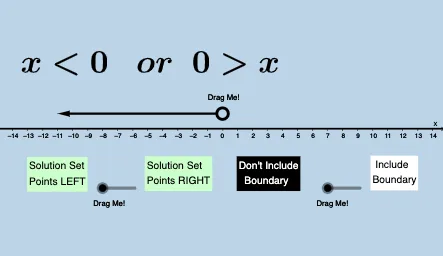
This example uses a dynamic “graph illustrator” to visualize how the feasible region of a basic one-variable inequality changes as the interval is partitioned. It builds an interactive representation of area approximation using the upper and lower sum (closely connected to Riemann-sum ideas), while also emphasizing the boundary/perimeter intuition of the region. The construction leverages GeoGebra commands and objects such as Random (to generate parameter-dependent elements), Segment and Point (to create interval endpoints, partition lines, and key geometric points), DynamicCoordinates (to update geometry interactively), and Vector (to support directional/dynamic graphical components). Multiple text objects (text1–text8, including text5–text8) are used to label parameters and results, and button1 controls the animation or state changes. Suitable for secondary education (inequalities and graph interpretation) and pre-calculus/calculus preparation where students need a visual bridge between partitioning, bounding sums, and area concepts.
GeoGebra Commands & Parameters
Random(-10, 10) → aSegment((-10, 1), (10, 1)) → hPoint(h) → ARandom(1, 4) → eRandom(0, 1) → rDynamicCoordinates(A, round(x(A)), 1) → BVector((x(B) + 0.4, 1), (11, 1)) → uVector((x(B) - 0.4, 1), (-11, 1)) → v
AI Drawing Prompt Reference
Draw a horizontal line segment as a number line, with a randomly chosen integer point on it as a partition point. From this point, extend two horizontal arrows to the left and right, indicating the direction of interval partitioning. Below the line, label randomly generated parameter values, and include a button to control animation. The overall figure illustrates how the feasible region of an inequality changes with partitioning, using upper and lower sums and boundary intuition to visualize area approximation.
The prompt above was compiled from the original drawing commands and is for reference only.