
Dynamic Illustration of Similar Circles
Loading the math board and drawing, please wait…
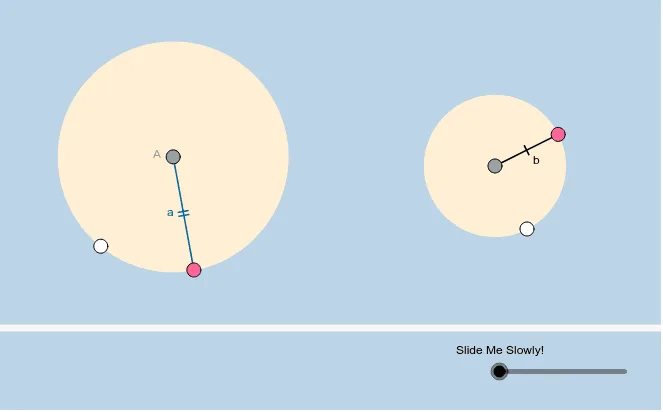
This example demonstrates to students that all circles are similar through dynamic illustration. It involves core math concepts like circles, similarity transformation, and geometric construction. The construction uses commands/objects such as Circle, Point, Segment, Dilate, Vector, Translate, and Intersect in GeoGebra. Suitable for high school students to understand circle similarity and transformation applications.
GeoGebra Commands & Parameters
Circle(A, B) → cCircle(C, D) → dPoint(c) → EPoint(d) → FSegment(A, E) → aSegment(C, F) → bDilate(C, If[0 < a_1 ≤ 1, 1 - a_1, 0], A) → C'Vector(C, C') → uTranslate(d, u) → d'Translate(C, u) → C'_1Translate(C, u) → C'_2Translate(F, u) → F'Segment(C'_2, F') → g'Intersect(h, a, 1) → GDilate(G, If[2 < a_1 ≤ 3, 3 - a_1, 0], E) → G'Circle(A, G') → k
AI Drawing Prompt Reference
Draw two circles c and d, then pick point E on circle c and point F on circle d. Connect AE and CF. With A as the center and AE as the radius, draw circle c'. With C as the center and CF as the radius, draw circle d'. Then, starting from A, draw vector u in the direction of AE, and translate circle c' by vector u to get circle c''. Translate point C by vector u to get C'1 and C'2. Draw line segment g' from C'2 to F'. Find the intersection of line segment AE and circle c', name it G, and draw circle k with E as the center and EG as the radius.
The prompt above was compiled from the original drawing commands and is for reference only.