
Dynamic Exploration of Base Angles in Isosceles Triangles
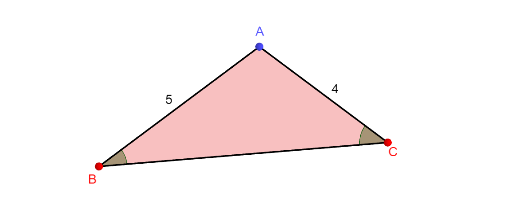
Loading the math board and drawing, please wait…
This GeoGebra example demonstrates the fundamental property of isosceles triangles: the base angles are equal. Key mathematical concepts include the definition of isosceles triangles, the base angle theorem, and axial symmetry. Construction details: Use Polygon to create triangle ABC, Angle commands to measure angles B and C, Rotate commands for folding animations (foldB, foldC) to visualize symmetry, and Slider animations (α) to dynamically adjust the triangle shape. Suitable for middle school math teachers demonstrating triangle properties or students exploring isosceles triangle characteristics as preparation for understanding triangle congruence criteria.
GeoGebra Commands & Parameters
PointIn(b) → BPointIn(c) → CPolygon(A, B, C) → t3, c_1, a, b_1Intersect(a, OrthogonalLine[A, a, space]) → DSegment(A, D) → fRotate(CircleSector[C, C + (0.7 * UnitVector[Segment[C, A]]), D, xOyPlane], (180° * t2), f) → dRotate(CircleSector[B, B + (0.7 * UnitVector[Segment[B, A]]), D], (-180° * t1), f) → eRotate(Polygon[{A, D, C}], (180° * t2), f) → t4Rotate(Polygon[{A, D, B}], (-180° * t1), f) → t5Angle(C, D, A) → α
AI Drawing Prompt Reference
Draw a dynamic exploration of the base angles in isosceles triangles. The figure includes an isosceles triangle ABC with equal base angles B and C. Use rotation commands to visualize axial symmetry and a slider to dynamically adjust the triangle shape. The construction order is: first create triangle ABC, then measure the base angles, then visualize symmetry with rotation commands, and finally adjust the shape with animations to observe changes.
The prompt above was compiled from the original drawing commands and is for reference only.