
Dynamic Demo of Trigonometry and Orthocenter
Loading the math board and drawing, please wait…
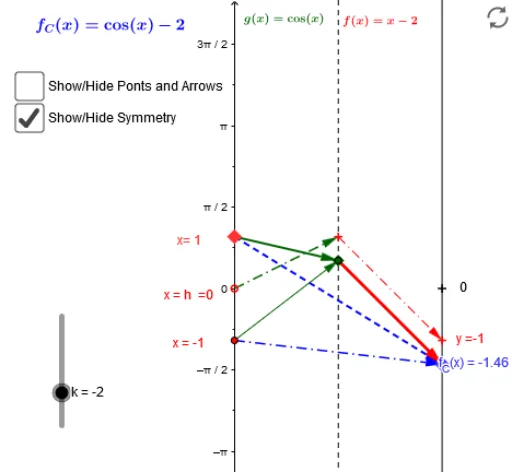
This example dynamically demonstrates the relationship between the orthocenter, trigonometric functions, vectors, and cones in a triangle. It involves core concepts like trigonometric functions, vector operations, coordinate geometry, and solid geometry. Construction highlights include commands like Point, Vector, Segment, Sequence, Zip, and objects such as the orthocenter H1 and vector u. Suitable for high school and above, it helps understand the application of trigonometry in geometry and the construction of dynamic geometry.
GeoGebra Commands & Parameters
Point(yAxis) → aVector(a, B) → uSegment(C, D) → eVector(E, F) → vVector(G, H) → wSegment(f_x, J) → jSequence(h - π, h + π, π / 6) → x_*Zip((k, f(k)), k, x_*) → list1Zip(Vector[(0, k), (2, f(k))], k, x_*) → list2Zip(Segment[(i, f(i)), ((2 * h) - i, f((2 * h) - i))], i, x_*) → list3Zip(Segment[(i, f(i)), (π - i, f(π - i))], i, x_*) → suplZip(Vector[(0, t), (1, s(t))], t, x_*) → l1Zip(Vector[(1, s(t)), (2, f(t))], t, x_*) → l2Vector(a, L) → mVector(L, B) → nVector(E, M) → qVector(M, B) → rVector(C, N) → tVector(N, O) → u_1
AI Drawing Prompt Reference
Demonstrate the dynamic relationship between the orthocenter, trigonometric functions, vectors, and cones in a triangle. Start by plotting the orthocenter, then use vector operations and coordinate geometry to show the connection between vectors and trigonometric functions, constructing a series of dynamically changing segments and vectors to illustrate the application of trigonometry in geometry and the construction of dynamic geometry.
The prompt above was compiled from the original drawing commands and is for reference only.