
Dynamic Construction of a Triangle's Incircle Using Vectors
Loading the math board and drawing, please wait…
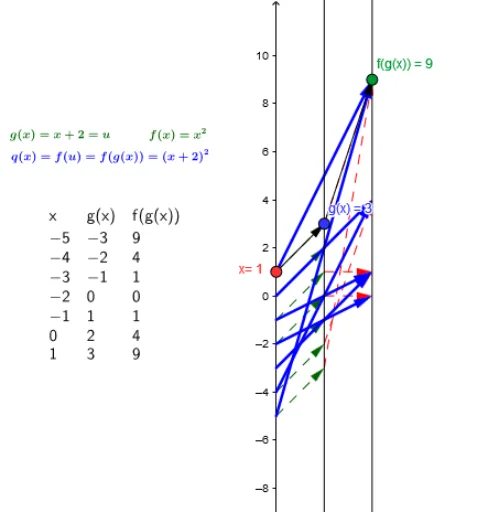
This GeoGebra example demonstrates how to dynamically construct the incircle of a triangle and compute its center and radius using vectors and linear functions. Users can enter the coordinates of the triangle's vertices via text fields; the construction uses the Point and Vector commands to calculate the incenter and inradius, then employs Sequence and Zip to generate the points of tangency, and displays the results in a table via TableText. The activity covers key concepts such as the incircle property of triangles, vector operations, linear equations, and coordinate geometry. It is suitable for middle and high school mathematics teachers and students to illustrate the construction steps of an incircle, verify its properties, and engage in exploratory learning.
GeoGebra Commands & Parameters
Point(yAxis) → AVector(A, B) → uVector(B, C) → vTextfield(g) → inputBox1Textfield(f) → inputBoxfSequence(-5, 1, dx) → NZip(Vector[(2, g(z)), (4, f(g(z)))], z, N) → fgx_*Zip(Vector[(0, z), (2, g(z))], z, N) → g_*Zip((z, g(z)), z, N) → Pg_*Zip((z, f(g(z))), z, N) → Pfg_*Zip(Vector[(0, z), (4, f(g(z)))], z, N) → qx_*TableText(Transpose[{Append["x", N], Append["g(x)", g(N)], Append["f(g(x))", f(g(N))]}]) → Table
AI Drawing Prompt Reference
Draw a dynamic incircle of a triangle, showing how to calculate the incenter and radius using vectors and linear functions. Users input the vertices' coordinates, and the construction calculates the incenter via points and vectors, generates tangency points with sequence and combination commands, and displays the results in a table.
The prompt above was compiled from the original drawing commands and is for reference only.