
Dynamic and Modifiable Illustration of a Relationship Between 2 Internally Tange
Loading the math board and drawing, please wait…
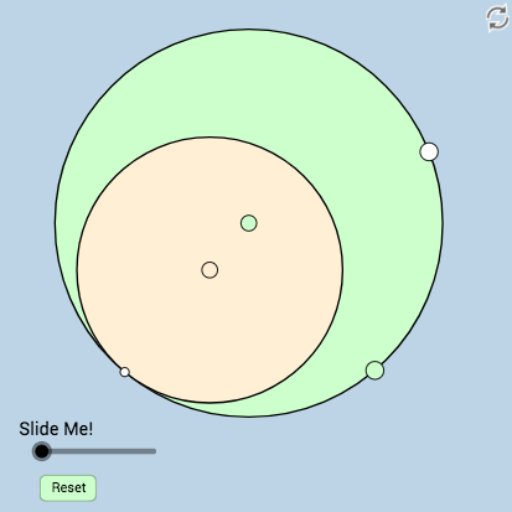
This GeoGebra example dynamically illustrates a geometric relationship between two internally tangent circles, allowing users to modify the construction and observe how the relationship changes. The core mathematical concepts involve tangent circles, points of tangency, center distances, and derived angles, segments, and symmetry properties. The construction utilizes GeoGebra commands such as Circle, Segment, PointIn, Distance, Intersect, Point, Tangent, Ray, Min, CircleSector, Angle, Dilate, and Rotate, creating numerous objects including circles, segments, intersection points, tangents, rays, sectors, angles, and dilated/rotated copies (e.g., A, B, c, f, b, C, d, e, D, E, g, h, F, G, i, j, k, l, m, n, o, p, H, I, q, α, r, E', s, G', t, C', f_1, D', D'_1, D'_2, g_1, h_1, i_1, β). It is suitable for high school and above, serving as a tool for exploring circle-circle tangency, tangent line properties, and dynamic geometric construction techniques, ideal for classroom demonstrations or independent student investigation.
GeoGebra Commands & Parameters
Circle(A, B) → cSegment(A, B) → fPointIn(b) → CDistance(C, c) → dCircle(C, d) → eIntersect(e, c) → D, , ,Point(c) → ETangent(E, e) → g, hIntersect(c, g, 2) → FIntersect(e, g) → GRay(D, E) → iRay(D, F) → jRay(D, G) → kSegment(D, F) → lSegment(D, G) → mSegment(D, E) → nMin({l, m, n}) → oCircle(D, (0.3 * o)) → pIntersect(p, k, 1) → HIntersect(p, i, 1) → ICircleSector(D, I, H) → qAngle(C, G, E) → αDilate(E, If[0 < r ≤ 1, 1 - r, 0], G) → E'Segment(E, E') → sDilate(G, If[1 < r ≤ 2, 2 - r, 0], F) → G'Segment(G, G') → tDilate(C, If[2 < r ≤ 3, 3 - r, 0], G) → C'Segment(C, C') → f_1Dilate(D, If[3 < r ≤ 4, 4 - r, 0], G) → D'Dilate(D, If[3 < r ≤ 4, 4 - r, 0], E) → D'_1Dilate(D, If[3 < r ≤ 4, 4 - r, 0], F) → D'_2Segment(D, D'_1) → g_1Segment(D, D') → h_1Segment(D, D'_2) → i_1Angle(E, D, G) → βRotate(I, If[4 < r ≤ 5, ((r - 4) * β), β], D) → I'CircleSector(D, I, I') → c_1Rotate(q, If[6 < r ≤ 7, ((r - 6) * β), β], D) → q'Circle(A, B) → ccCircle(C, D) → ee
AI Drawing Prompt Reference
Draw two internally tangent circles, with the smaller circle inside the larger one and touching it at a point. Pick a point on the larger circle, draw a tangent line from it to the smaller circle, and let this tangent meet the larger circle again at another point. Connect the tangency point of the circles with these points using segments and rays. Construct a small sector centered at the tangency point, and label relevant angles. Then, based on an adjustable parameter, dilate or rotate certain points to create dynamic auxiliary segments and sectors, illustrating how the geometric relationship changes as the construction is modified.
The prompt above was compiled from the original drawing commands and is for reference only.