
Drawing Symmetrical Polygons
Loading the math board and drawing, please wait…
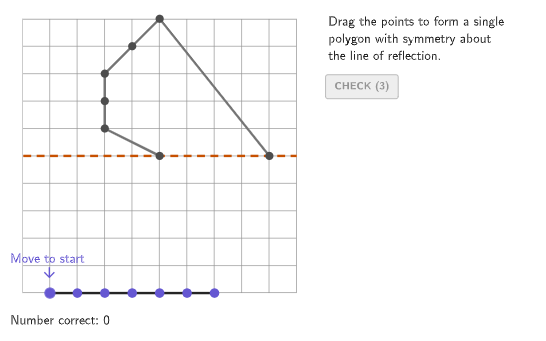
This example demonstrates how to draw symmetrical polygons by mirroring given points. Key mathematical concepts include symmetry and polygons. GeoGebra commands such as Rotate, Polygon, and PointIn are used in the construction. Suitable for students in grades 4-5 to learn about identifying and drawing lines of symmetry.
GeoGebra Commands & Parameters
Element({0°, 90°, 45°}, caseNum) → rotAngleRotate(xAxis, rotAngle) → axisPolygon({(min, min), (min, max), (max, max), (max, min)}) → viewboxPointIn(viewbox) → P1PointIn(viewbox) → P2PointIn(viewbox) → P3PointIn(viewbox) → P4PointIn(viewbox) → P5PointIn(viewbox) → P6PointIn(viewbox) → P7Shuffle({-5, -1}) → randomX5, {-1, -5}Element({0, Element[randomX5, Mod[countQuestion, Length[randomX5]] + 1], 0}, caseNum) → x5Shuffle({-1, -1, -1, -1, -2, -2, -2, -2, -3, -3, -3, -3, -4, -4, -4, -4}) → randomX, {-2, -2, -2, -1, -1, -4, -4, -2, -3, -1, -3, -4, -4, -3, -3, -1}Element(randomX, Mod[(4 * countQuestion) + 3, Length[randomX]] + 1) → x4Element(randomX, Mod[(4 * countQuestion) + 2, Length[randomX]] + 1) → x3Element(randomX, Mod[(4 * countQuestion) + 1, Length[randomX]] + 1) → x2Element(randomX, Mod[(4 * countQuestion), Length[randomX]] + 1) → x1Zip(Mirror[A, axis], A, givenPoints) → expectedResultZip(A ≟ B, A, expectedResult, B, studentPoints) → correctCheck1Zip(A ≟ B, A, expectedResult, B, Reverse[studentPoints]) → correctCheck2If(reverseOrder, Reverse[correctCheck2], correctCheck1) → correctFinalIf(reverseOrder, Reverse[studentPoints], studentPoints) → studentOrderedPointsFlatten(Zip[{x(A), y(A)}, A, studentPoints]) → inputCurrentPolygon(Element[{{(min, min), (min, 0), (max, 0), (max, min)}, {(0, min), (0, max), (max, max), (max, min)}, {(min, min), (max, max), (max, min)}}, caseNum]) → correctRegionZip(IsInRegion[A, correctRegion], A, studentPoints) → regionCheckPolygon(Zip[PixelsToPoint[Corner[1], Corner[3], Corner[5], A], A, {(pixelsLeft, pixelsTop), (pixelsLeft, y(Corner[5]) - pixelsBottom), Corner[5] - (pixelsRight, pixelsBottom), (x(Corner[5]) - pixelsRight, pixelsTop)}]) → borderBoxCorner(5) → layoutAppSizeexpandCircle(P1, 7 + haloPixels, Corner[1], Corner[3], Corner[5]) → pulsingObjectPolyLine(givenPoints) → givenPatternPolyLine(expectedResult) → expectedPatternZip(If[(¬A) ∧ (¬B) ∧ tries > 0, {228 / 255, 68 / 255, 97 / 255}, {101 / 255, 87 / 255, 210 / 255}], A, correctFinal, B, pointMoved) → pointColorPolyLine(studentPoints) → studentPatternSequence((A, -5), A, -4, 3) → startPointsZip(Vector[A, B], B, If[correctFinal ≟ correctCheck1, expectedResult, Reverse[expectedResult]], A, studentPoints) → moveVecsZip(A + (animate * B), A, studentPoints, B, moveVecs) → movePointsPolyLine(movePoints) → animateAnsPolygon({(min - 0.5, min - 0.5), (min - 0.5, max + 1), (max + 1, max + 1), (max + 1, min - 0.5)}) → coverScreenSequence((((((("SetFixed(P" * A) * ",") * correctFinal(A)) * ",!") * correctFinal(A)) * ")"), A, If[reverseOrder, Length[studentPoints], 1], If[reverseOrder, 1, Length[studentPoints]], If[reverseOrder, -1, 1]) → cmdLockPointsSequence((("SetFixed(P" * A) * ",false,true)"), A, 1, Length[studentPoints]) → cmdUnlockPointsRemoveUndefined(Zip[If[A, B], A, correctFinal, B, studentPoints]) → correctPointsPolygon({(min, min), (min, max), (max, max), (max, min)}) → viewBorderSequence((("SetFixed(P" * A) * ",true,false)"), A, 1, Length[studentPoints]) → cmdLockAll
AI Drawing Prompt Reference
Draw a symmetrical polygon, such as a square or rectangle, by mirroring given points to create symmetric shapes. The figure includes a rectangular base area, a polygon, and points marked within the rectangle. Students should identify symmetry axes and draw symmetric figures, while checking whether points lie inside the polygon. The construction order is: first create the rectangle, then use mirroring to generate symmetric points, and finally verify the relationship between points and the polygon.
The prompt above was compiled from the original drawing commands and is for reference only.