
Doubling the Cube
Loading the math board and drawing, please wait…
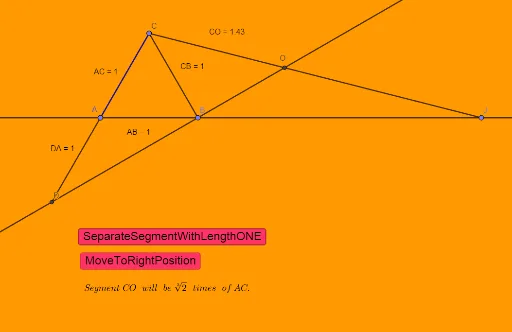
This example demonstrates the problem of doubling the cube, which involves constructing a cube with twice the volume of a given cube using geometric methods. Key mathematical concepts include geometric construction and solid geometry. Using GeoGebra commands such as Point, Segment, Polygon, Circle, and Line, the required geometric shapes can be constructed. Suitable for high school mathematics education and learning.
GeoGebra Commands & Parameters
Point(Circle[A, 1]) → BSegment(A, B) → fPolygon(A, B, 3) → poly1, g, h, i, CCircle(A, 1) → cLine(A, C) → jIntersect(c, j, 1) → DLine(D, B) → kLine(A, B) → lSegment(D, C) → mSegment(C, B) → nCircle(C, nroot(2,3)) → dIntersect(d, k, 2) → ELine(C, E) → pIntersect(l, p) → FDistance(A, C) → distanceACDistance(D, A) → distanceDADistance(C, B) → distanceCBDistance(A, B) → distanceABCircle(F, 2) → eIntersect(e, l, 2) → GIntersect(e, l, 1) → HSegment(G, F) → qSegment(H, F) → rPoint(q) → ISegment(G, H) → sSegment(G, F) → tPoint(t) → JSegment(C, J) → aCircle(J, 1) → c_1Intersect(c_1, a, 1) → KSegment(C, K) → bSegment(A, J) → f_1Point(b) → LPoint(f_1) → MSegment(L, M) → g_1Segment(C, J) → h_1Line(A, B) → i_1Intersect(k, h_1) → NDistance(L, N) → distanceLNMidpoint(L, N) →Intersect(k, h_1) → ODistance(C, O) → distanceCOMidpoint(C, O) →
AI Drawing Prompt Reference
Draw a cube and construct a new cube with double the volume of the original. Start by drawing a circle with the side of the cube as the diameter, then draw another circle with the vertex as the center. Connect the intersection points to form a new geometric shape. Continue by drawing circles with relevant points as centers, finding new intersection points, and connecting these to form one side of the new cube, ultimately showing the increased volume cube.
The prompt above was compiled from the original drawing commands and is for reference only.