
Double W Truss
Loading the math board and drawing, please wait…
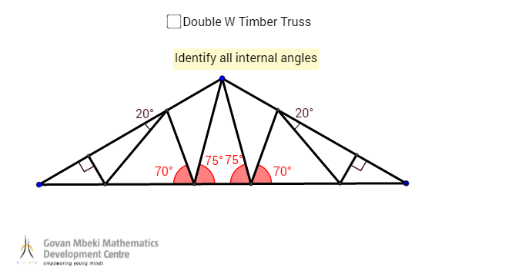
This example demonstrates the structure and geometric properties of a Double W Truss. Core math concepts include geometric construction, angle calculation, and line segment relationships. Key GeoGebra commands used are Rotate, Line, Segment, OrthogonalLine, Intersect, and Angle. Suitable for high school and above students studying truss structures, geometric modeling, and spatial geometry.
GeoGebra Commands & Parameters
Rotate(A_2, 120°, B_2) → A'_1Line(B_2, A_2) → f_2Line(B_2, A'_1) → g_2Line(A_2, A'_1) → h_2Segment(A_2, B_2) → i_2Segment(B_2, A'_1) → j_2Segment(A'_1, A_2) → k_2OrthogonalLine(B_2, k_2) → a_2Rotate(A_2, 30°, B_2) → A_1Line(B_2, A_1) → f_1Rotate(A'_1, (-(30°)), B_2) → E_1Line(B_2, E_1) → j_1Rotate(A'_1, (-(45°)), B_2) → CRotate(A_2, 45°, B_2) → DLine(B_2, D) → fLine(B_2, C) → gIntersect(f, k_2) → EIntersect(g, k_2) → FIntersect(j_2, k_2) → GIntersect(g, k_2) → HIntersect(j_2, k_2) → IRotate(A'_1, 70°, F) → JAngle(A'_1, F, J) → γRotate(A_2, (-(70°)), E) → KAngle(K, E, A_2) → δLine(E, K) → hLine(F, J) → iIntersect(h, i_2) → LIntersect(i, j_2) → MRotate(A'_1, (-(20°)), M) → NAngle(N, M, A'_1) → εRotate(A_2, 20°, L) → OAngle(A_2, L, O) → ζLine(L, O) → jLine(M, N) → kIntersect(j, k_2) → PIntersect(k, k_2) → QOrthogonalLine(P, k_2) → lOrthogonalLine(Q, k_2) → mSegment(P, L) → pSegment(E, L) → qSegment(E, B_2) → rSegment(F, B_2) → sSegment(F, M) → tSegment(M, Q) → aAngle(F, E, B_2) → ηAngle(B_2, F, E) → θOrthogonalLine(Q, j_2) → nOrthogonalLine(P, i_2) → bIntersect(b, i_2) → RIntersect(n, j_2) → SSegment(P, R) → cSegment(Q, S) → dAngle(A_2, R, P) → ιAngle(Q, S, A'_1) → κ