
Double Torus (Doppelreifen) Dynamic Construction
Loading the math board and drawing, please wait…
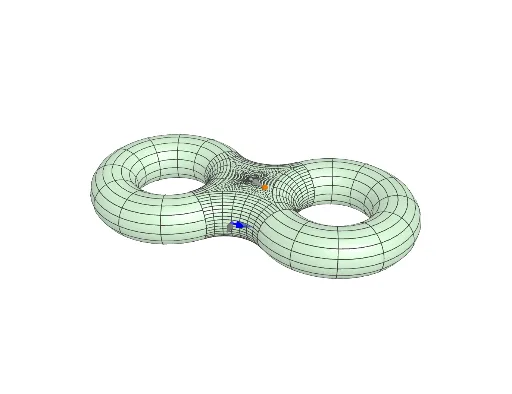
① This GeoGebra example demonstrates the construction of a double torus (two connected torus-like surfaces) with interactive sliders and buttons, allowing users to explore the generation and transformation of the 3D shape. ② Core mathematical concepts include parametric surface equations, spatial transformations of circles and points, vector operations, and derivatives (used to control motion), along with natural numbers and arithmetic operations. ③ Construction highlights: commands such as If, Surface, Circle, Point, and Vector are used; multiple auxiliary objects (r, Xneu, R1re, R2li, etc.) are defined; the torus surfaces are parameterized (TorusX) and conditionally displayed via If; sliders (animate) and buttons (button2) provide interactive animation. ④ Suitable for high school to undergraduate students learning 3D geometry, parametric surfaces, and dynamic mathematical visualization, and useful for teachers creating interactive geometry lessons.
GeoGebra Commands & Parameters
If(R1re ∨ R3vo, 1, R2li ∨ R4hi, -1, 0) → XcenIf(R1re ∨ R4hi, 1, R2li ∨ R3vo, -1, 0) → YcenSurface(1 + (sin(s) * (1 + (r * cos(t)))), 1 + (cos(s) * (1 + (r * cos(t)))), (r * sin(t)), s, ((-π)) / 2, π, t, 0, (2 * π)) → TorRechtsSurface(-1 + (sin(s) * (1 + (r * cos(t)))), -1 + (cos(s) * (1 + (r * cos(t)))), (r * sin(t)), s, π / 2, (2 * π), t, 0, (2 * π)) → TorLinksSurface(-1 + (sin(s) * (1 + (r * cos(t)))), 1 + (cos(s) * (1 + (r * cos(t)))), (r * sin(t)), s, π / 2, π, t, π / 2, (3 * π / 2)) → BogHintenSurface(1 + (sin(s) * (1 + (r * cos(t)))), -1 + (cos(s) * (1 + (r * cos(t)))), (r * sin(t)), s, (3 * π / 2), (2 * π), t, π / 2, (3 * π / 2)) → BogVorneSurface(1 + (sin(s) * (1 + (r * cos(t)))), 1 + (cos(s) * (1 + (r * cos(t)))), (r * sin(t)), s, π, (3 * π / 2), t, π / 2, (3 * π / 2)) → TorReZusSurface(((s * (abs(cos(t)) + abs(sin(t)) - sqrt((abs(cos(t)) + abs(sin(t)))^(2) - 1))) * sin(t)), ((s * (abs(cos(t)) + abs(sin(t)) - sqrt((abs(cos(t)) + abs(sin(t)))^(2) - 1))) * cos(t)), r, s, 0, 1, t, 0, (2 * π)) → FlachDeckelSurface(((s * (abs(cos(t)) + abs(sin(t)) - sqrt((abs(cos(t)) + abs(sin(t)))^(2) - 1))) * sin(t)), ((s * (abs(cos(t)) + abs(sin(t)) - sqrt((abs(cos(t)) + abs(sin(t)))^(2) - 1))) * cos(t)), (-r), s, 0, 1, t, 0, (2 * π)) → FlachBodenSurface((-1 + (sin(s) * (1 + (r * cos(t)))), -1 + (cos(s) * (1 + (r * cos(t)))), (r * sin(t))), s, 0, π / 2, t, π / 2, (3 * π / 2)) → TorLiZusCircle(Xstart, 1 / 3, xOyPlane) → cPoint(c) → XstartPfeilspitzeVector(Xstart, XstartPfeilspitze) → ZeigeStartIf(R5oben, (0, 0, 1), R5unten, (0, 0, -1), (Xneu - Rpoint) / Length[Xneu - Rpoint]) → NneuVector(Xneu, Xneu + Vneu / 3) → ZeigeXVneuVector(Xneu, Xneu + Nneu / 3) → ZeigeNneuIf(R5oben, (x(Xneu), y(Xneu), r), R5unten, (x(Xneu), y(Xneu), (-r)), Rpoint + (TorusX / Length[TorusX] * r)) → Xneuer
AI Drawing Prompt Reference
Create a 3D double torus shape consisting of two connected torus-like rings arranged symmetrically in a figure-eight pattern. The main rings are positioned on the left and right sides, with centers near (1,1) and (-1,-1), and their thickness is adjustable via a parameter. Flat circular caps cover the top and bottom, linking the two rings vertically. Additional connecting tubes join the rings at the front and back. Include interactive sliders and buttons to dynamically change the ring radius and position, and display auxiliary vectors indicating the starting point, normal direction, and motion direction. The surface should be smooth and parametric, suitable for exploring spatial geometry transformations.
The prompt above was compiled from the original drawing commands and is for reference only.