
Double Integral Volume Demo
Loading the math board and drawing, please wait…
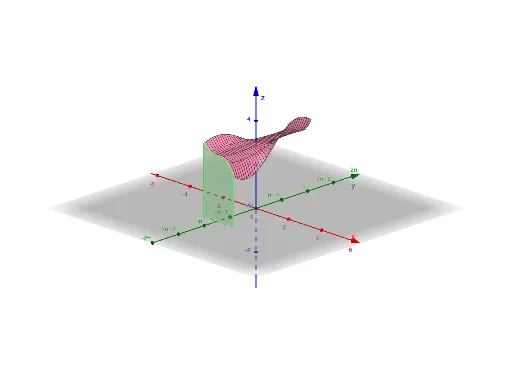
This example demonstrates how to calculate the volume of a solid under a surface using double integrals in three-dimensional space. Key math concepts include double integrals, volume calculation, symmetry, differential calculus, and 3D vectors. Construction highlights involve commands like Polygon, Textfield, Surface, and Segment from GeoGebra. Suitable for high school and above students to understand the application of integrals in geometry.
GeoGebra Commands & Parameters
Polygon(D, B, L, M, C, A, E, F, G, H, I, J, K) → poly1, d, k, l, m, c_1, b, a_1, e, f_1, g, h, i, jTextfield(o) → InputBox1Textfield(t) → InputBox2Textfield(u) → InputBox3Textfield(v) → InputBox4Textfield(w) → InputBox5Surface(a, b, o(a, b), a, t, u, b, v, w) → aSegment((u, q, 0), (u, q, o(u, q))) → nSegment((t, q, 0), (t, q, o(t, q))) → rSegment((t, q), (u, q)) → s
AI Drawing Prompt Reference
Create a 3D visualization of a solid volume under a surface: draw a polygonal base on the coordinate plane with multiple vertices, then place a curved surface above it defined by a two-variable function)Skip. Within the base region, draw vertical line segments from the base up to the surface to represent differential heights, and connect their tops with horizontal segments to show the integration area. Include several input boxes on the side for adjusting function parameters and integration bounds, illustrating the concept of double integrals for volume calculation. Emphasize the spatial relationship between the surface, base, vertical segments, and input controls.
The prompt above was compiled from the original drawing commands and is for reference only.