
Double Cone and Plane (2)
Loading the math board and drawing, please wait…
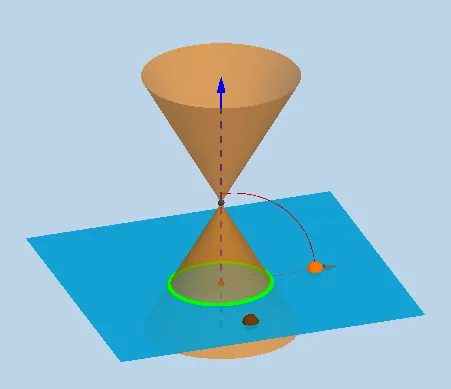
① This example demonstrates how the intersection of a double cone (two apex-opposite infinite cones) with a dynamically adjustable plane changes continuously from a circle, ellipse, parabola, to hyperbola, visually revealing the unified geometric origin of conic sections. ② Core mathematical concepts include conic sections (circle, ellipse, parabola, hyperbola), intersection of spatial planes and surfaces, symmetry and reflection, and parameter control in dynamic geometry. ③ Construction highlights: uses InfiniteCone to create the double cone, Plane to define the cutting plane, and IntersectPath to obtain the intersection curve; employs OrthogonalLine, Mirror, Ray, Vector for auxiliary lines and symmetry; uses Slider and Textfield to control plane position and angle, and Button to trigger animation for dynamic switching of intersection types. ④ Suitable for high school or early college analytic geometry and solid geometry teaching, also useful in calculus for visualizing surface cross-sections, helping students understand the relationship between conic sections and spatial geometry.
GeoGebra Commands & Parameters
OrthogonalLine(M, xOyPlane) → aPoint(a) → BLine(A, yAxis) → gCircle(A, 16, xAxis) → cIntersect(g, c) → X_1, JIntersect(zAxis, c) → Z_1, Z_2CircleArc(A, X_1, Z_1) → fPoint(f) → CCIf(j < 0, A + (0, (16 * cos(0)), (16 * sin(0))), If[j < π / 2 - α - 0.01, A + (0, (16 * cos(j)), (16 * sin(j))), If[j < π / 2 - α + 0.1, A + (0, (16 * cos(π / 2 - α)), (16 * sin(π / 2 - α))), If[j < π / 2 + 0.1, A + (0, (16 * cos(j - 0.1)), (16 * sin(j - 0.1))), If[j > π / 2 + 0.1, A + (0, (16 * cos(π / 2)), (16 * sin(π / 2)))]]]]) → XXIf(anim, XX, CC) → CPoint(zAxis) → HIntersect(zAxis, xAxis) → OLine(C, A) → dLine(A, B) → bPlane(d, b) → eMirror(H, xOyPlane) → H'Point(zAxis) → IInfiniteCone(O, H, α) → mIntersectPath(e, m) → pVertex(p) → D, E, F, GAngle(C, A, Z_1) → βCircleArc(A, C, Z_1) → hCircle(A, 20, xAxis) → kRay(A, C) → iIntersect(i, k) → K,Vector(A, K) → lTextfield(α) → inputBox1
AI Drawing Prompt Reference
Draw a graph of the intersection between a double cone and a plane. The double cone consists of two opposite infinite cones, and the plane can be dynamically adjusted. The intersection curve changes continuously from a circle to an ellipse, parabola, or hyperbola, revealing the geometric origin of conic sections. The graph includes the cone, plane, intersection curve, and auxiliary lines such as perpendicular lines, symmetry lines, and rays to maintain symmetry. The plane's position and angle are controlled by a slider, and animation can switch intersection types. The construction order is to first establish the coordinate system and auxiliary lines, then create the double cone and plane, and finally compute the intersection curve and add symmetry elements.
The prompt above was compiled from the original drawing commands and is for reference only.