
Dot Product and Vector Projections
Loading the math board and drawing, please wait…
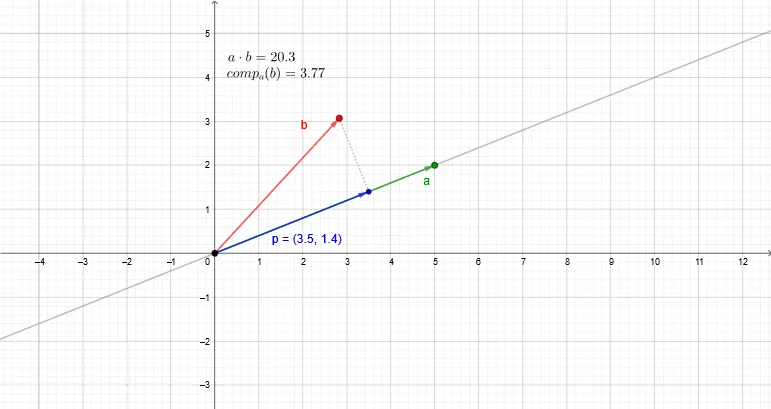
Explore the projection of one vector onto another and its relationship with the dot product. This interactive GeoGebra example allows users to visualize vector decomposition, orthogonal lines, and intersection points, providing an intuitive grasp of the geometric meaning of the dot product. The construction uses GeoGebra commands such as Vector, Line, OrthogonalLine, Intersect, and Segment, with objects like O, A, a, f, B, b, h, P, p, k, d, dotprod, c, component, v, and vectproj. It is designed for middle school and high school students studying vectors.
GeoGebra Commands & Parameters
Vector(O, A) → aLine(O, A) → fVector(O, B) → bOrthogonalLine(B, f) → hIntersect(h, f) → PVector(O, P) → pSegment(B, P) → k
AI Drawing Prompt Reference
Draw vector a starting from the origin O and vector b, with the perpendicular line h of vector b intersecting line f of vector a at point P. Connect point B to P to form segment k. Observe the projection of vector b onto vector a as vector v and vector p from point P to the origin O, to understand the relationship between vector projection and dot product.
The prompt above was compiled from the original drawing commands and is for reference only.