
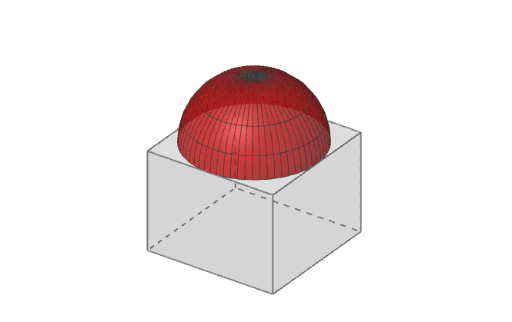
Dome with Cantilever Construction
Loading the math board and drawing, please wait…
In collections
muqarnas - English version
This example demonstrates the geometric construction of a dome with cantilever elements. It involves core mathematical concepts such as polygon construction, solid geometry generation, and symmetry analysis. Key GeoGebra commands and objects used in the construction include Segment, Point, Polygon, Prism, Surface, Line, Circle, Cylinder, Intersect, Rotate, and Mirror. It is suitable for high school and above students for learning spatial geometry and developing visualization skills.
GeoGebra Commands & Parameters
Segment(A, AA) → fPoint(f) → ISegment(A, I) → gPolygon(A, B, C, D) → veelhoek1, a_1, b_1, c, dPrism(veelhoek1, -1.5) → e, E, Ribbe1, Ribbe2, Ribbe3, Ribbe4, Ribbe5, Ribbe6, Ribbe7, Ribbe8, F, G, H, zijvlak1, zijvlak2, zijvlak3, zijvlak4, zijvlak5Surface(cos(α), sin(α), sin(α), α, 0°, 180°, α, 0°, 180°) → bSurface(cos(α), sin(α), cos(β), α, 0°, 360°, β, 0, 90°) → aSurface((sqrt(1 - h^(2)) * cos(θ)), (sqrt(1 - h^(2)) * sin(θ)), h, θ, 0, 6.28319, h, 0, 1) → hLine(O, OO) → asCircle(O, 1, as) → kCylinder(k, 1.5) → i_3, i_2, i_3Intersect(yAxis, zijvlak4) → JRotate(J, 22.5°, as) → J'Line(O, J') → mIntersect(m, zijvlak5) → KSegment(A, D) → nIntersect(m, n) → LMirror(L, J) → L'Polygon(L, L', 8, xOyPlane) → veelhoek2, p, N, P, Q, R, S, q, r, s, t, f_1, g_1, h_1, MSegment(C, D) → i_1Rotate(L, -90°, i_1) → L'_1Polygon(L'_1, L, S) → veelhoek3, s_1, l'_1, l_1Rotate(veelhoek3, 90°, as) → veelhoek3'Rotate(veelhoek3, -90°, as) → veelhoek3'_1Rotate(veelhoek3, 180°, as) → veelhoek3'_2Rotate(L'_1, 90°, as) → TRotate(L'_1, -90°, as) → URotate(L'_1, 180°, as) → VPolygon(H, E, U, L', L, L'_1) → veelhoek4, h_2, e_1, u, l', l_2, l'_2Polygon(E, F, V, N, M, U) → veelhoek5, e_2, f_2, v, n_1, m_1, u_1Polygon(F, G, T, Q, P, V) → veelhoek6, f_3, g_2, t_1, q_1, p_1, v_1Polygon(G, H, L'_1, S, R, T) → veelhoek7, g_3, h_3, o_2, s_2, r_1, t_2