
Dodecahedron Net Construction
Loading the math board and drawing, please wait…
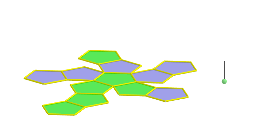
This example demonstrates the net of a dodecahedron, illustrating how a three-dimensional solid can be decomposed into a two-dimensional layout. Key mathematical concepts include polygons, geometric construction, spatial visualization, similar triangles, and coordinate geometry. The construction utilizes GeoGebra commands such as Point, Polygon, Segment, Rotate, Circle, and OrthogonalLine, emphasizing transformations and continuity. Suitable for high school solid geometry education, it helps students understand polyhedral nets and reconstruction, fostering spatial reasoning skills.
GeoGebra Commands & Parameters
Point(Circle[(((1 - sqrt(5)) * A) + ((3 + sqrt(5)) * B)) / 4, (Distance[A, B] * sqrt(10 + (2 * sqrt(5))) / 4), Segment[A, B]]) → CDodecahedron(A, B, C) → a, D, M, N, O, P, Q, R, S, T, faceABCDE, faceAEIOJ, E, faceABFKJ, faceBCGLF, faceCDHMG, faceDEINH, faceINSTO, faceJKPTO, faceFKPQL, faceGLQRM, faceHMRSN, facePQRST, F, edgeAE, edgeAB, edgeBC, edgeCD, edgeDE, edgeAJ, edgeEI, edgeIO, edgeJO, edgeJK, G, edgeFK, edgeBF, edgeFL, edgeGL, edgeCG, edgeGM, edgeHM, edgeDH, edgeHN, edgeIN, H, edgeNS, edgeST, edgeOT, edgePT, edgeKP, edgePQ, edgeLQ, edgeQR, edgeMR, edgeRS, I, J, K, LSegment(U, U + (0, 0, 2)) → bPoint(b) → VRotate(Polygon[A, B, F, K, J], (α * t), Segment[A, B]) → poly1Rotate(Polygon[F, K, P, Q, L], (α * t), Segment[K, F]) → poly2Rotate(Polygon[P, Q, R, S, T], (α * t), Segment[P, Q]) → poly3Rotate(poly2, (α * t), Segment[A, B]) → poly2'Rotate(poly3, (α * t), Segment[K, F]) → poly3'Rotate(poly3', (α * t), Segment[A, B]) → poly3''Circle(A, B, D) → cCenter(c) → WOrthogonalLine(W, Plane[A, B, D]) → dRotate(poly1, 72*°, d) → poly1'Rotate(poly1', 72*°, d) → poly1''Rotate(poly1'', 72*°, d) → poly1'''Rotate(poly1''', 72*°, d) → poly4Rotate(poly2', 72*°, d) → poly2''Rotate(poly2'', 72*°, d) → poly2'''Rotate(poly2''', 72*°, d) → poly5Rotate(poly5, 72*°, d) → poly5'Polygon(A, B, C, D, E) → poly6, a_1, b_1, c_1, d_1, eTableText({{LaTeX[A, true, true]}, {LaTeX[B, true, true]}, {LaTeX[C, true, true]}, {LaTeX[D, true, true]}, {LaTeX[E, true, true]}, {LaTeX[F, true, true]}, {LaTeX[G, true, true]}, {LaTeX[H, true, true]}, {LaTeX[I, true, true]}, {LaTeX[J, true, true]}, {LaTeX[K, true, true]}, {LaTeX[L, true, true]}, {LaTeX[M, true, true]}, {LaTeX[N, true, true]}, {LaTeX[O, true, true]}, {LaTeX[P, true, true]}, {LaTeX[Q, true, true]}, {LaTeX[R, true, true]}, {LaTeX[S, true, true]}, {LaTeX[T, true, true]}, {LaTeX[U, true, true]}, {LaTeX[V, true, true]}, {LaTeX[W, true, true]}}) → text1Rotate(poly2''', 72*°, d) → poly7Rotate(poly1'', 72*°, d) → poly1'''_1Polygon(A, B, C, D, E) → poly8, a_2, b_2, c_2, d_2, e_1Rotate(poly1''', 72*°, d) → poly9Rotate(poly5, 72*°, d) → poly5'_1Rotate(Polygon[A, B, F, K, J], (α * t), Segment[A, B]) → poly10Rotate(poly2, (α * t), Segment[A, B]) → poly2'_1Rotate(poly3', (α * t), Segment[A, B]) → poly3''_1Rotate(poly1, 72*°, d) → poly1'_1Rotate(poly2', 72*°, d) → poly2''_1Rotate(poly1', 72*°, d) → poly1''_1Rotate(poly2'', 72*°, d) → poly2'''_1
AI Drawing Prompt Reference
Draw the net of a dodecahedron, showing its two-dimensional layout. Start by creating a pentagon, then use rotations and connections to generate multiple connected polygons, simulating the unfolded structure before folding. Finally, combine these polygons into a complete dodecahedron net, highlighting its geometric construction and spatial relationships.
The prompt above was compiled from the original drawing commands and is for reference only.