
Dodecahedron Net by Anthony OR 柯志明
Loading the math board and drawing, please wait…
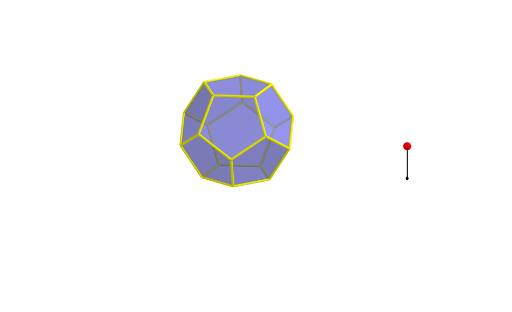
This example demonstrates the net of a dodecahedron and its construction process. Key math concepts include polygons, solid geometry, vectors, and transformations. Construction highlights involve using GeoGebra commands like Point, Dodecahedron, Segment, Rotate, Circle, Center, OrthogonalLine, Polygon, and TableText to draw points, lines, and faces, with operations like rotation and orthogonal lines. Suitable for high school students and math enthusiasts learning solid geometry and geometric construction.
GeoGebra Commands & Parameters
Point(Circle[(((1 - sqrt(5)) * A) + ((3 + sqrt(5)) * B)) / 4, (Distance[A, B] * sqrt(10 + (2 * sqrt(5))) / 4), Segment[A, B]]) → CDodecahedron(A, B, C) → a, D, M, N, O, P, Q, R, S, T, faceABCDE, faceAEIOJ, E, faceABFKJ, faceBCGLF, faceCDHMG, faceDEINH, faceINSTO, faceJKPTO, faceFKPQL, faceGLQRM, faceHMRSN, facePQRST, F, edgeAE, edgeAB, edgeBC, edgeCD, edgeDE, edgeAJ, edgeEI, edgeIO, edgeJO, edgeJK, G, edgeFK, edgeBF, edgeFL, edgeGL, edgeCG, edgeGM, edgeHM, edgeDH, edgeHN, edgeIN, H, edgeNS, edgeST, edgeOT, edgePT, edgeKP, edgePQ, edgeLQ, edgeQR, edgeMR, edgeRS, I, J, K, LSegment(U, U + (0, 0, 2)) → bPoint(b) → VRotate(Polygon[A, B, F, K, J], (α * t), Segment[A, B]) → poly1Rotate(Polygon[F, K, P, Q, L], (α * t), Segment[K, F]) → poly2Rotate(Polygon[P, Q, R, S, T], (α * t), Segment[P, Q]) → poly3Rotate(poly2, (α * t), Segment[A, B]) → poly2'Rotate(poly3, (α * t), Segment[K, F]) → poly3'Rotate(poly3', (α * t), Segment[A, B]) → poly3''Circle(A, B, D) → cCenter(c) → WOrthogonalLine(W, Plane[A, B, D]) → dRotate(poly1, 72°, d) → poly1'Rotate(poly1', 72°, d) → poly1''Rotate(poly1'', 72°, d) → poly1'''Rotate(poly1''', 72°, d) → poly4Rotate(poly2', 72°, d) → poly2''Rotate(poly2'', 72°, d) → poly2'''Rotate(poly2''', 72°, d) → poly5Rotate(poly5, 72°, d) → poly5'Polygon(A, B, C, D, E) → poly6, a_1, b_1, c_1, d_1, eTableText({{LaTeX[A, true, true]}, {LaTeX[B, true, true]}, {LaTeX[C, true, true]}, {LaTeX[D, true, true]}, {LaTeX[E, true, true]}, {LaTeX[F, true, true]}, {LaTeX[G, true, true]}, {LaTeX[H, true, true]}, {LaTeX[I, true, true]}, {LaTeX[J, true, true]}, {LaTeX[K, true, true]}, {LaTeX[L, true, true]}, {LaTeX[M, true, true]}, {LaTeX[N, true, true]}, {LaTeX[O, true, true]}, {LaTeX[P, true, true]}, {LaTeX[Q, true, true]}, {LaTeX[R, true, true]}, {LaTeX[S, true, true]}, {LaTeX[T, true, true]}, {LaTeX[U, true, true]}, {LaTeX[V, true, true]}, {LaTeX[W, true, true]}}) → text1Rotate(poly2''', 72°, d) → poly7Rotate(poly1'', 72°, d) → poly1'''_1Polygon(A, B, C, D, E) → poly8, a_2, b_2, c_2, d_2, e_1Rotate(poly1''', 72°, d) → poly9Rotate(poly5, 72°, d) → poly5'_1Rotate(Polygon[A, B, F, K, J], (α * t), Segment[A, B]) → poly10Rotate(poly2, (α * t), Segment[A, B]) → poly2'_1Rotate(poly3', (α * t), Segment[A, B]) → poly3''_1Rotate(poly1, 72°, d) → poly1'_1Rotate(poly2', 72°, d) → poly2''_1Rotate(poly1', 72°, d) → poly1''_1Rotate(poly2'', 72°, d) → poly2'''_1
AI Drawing Prompt Reference
Draw the net of a dodecahedron to demonstrate its construction process. Start by sketching twelve regular pentagons, then rotate and connect them to form the 3D shape of a dodecahedron. Use rotations and orthogonal lines to ensure accuracy in the shape, and label key points and edges, resulting in a clear and understandable net of a dodecahedron.
The prompt above was compiled from the original drawing commands and is for reference only.