
Dodecahedron Half Pyramid Net
Loading the math board and drawing, please wait…
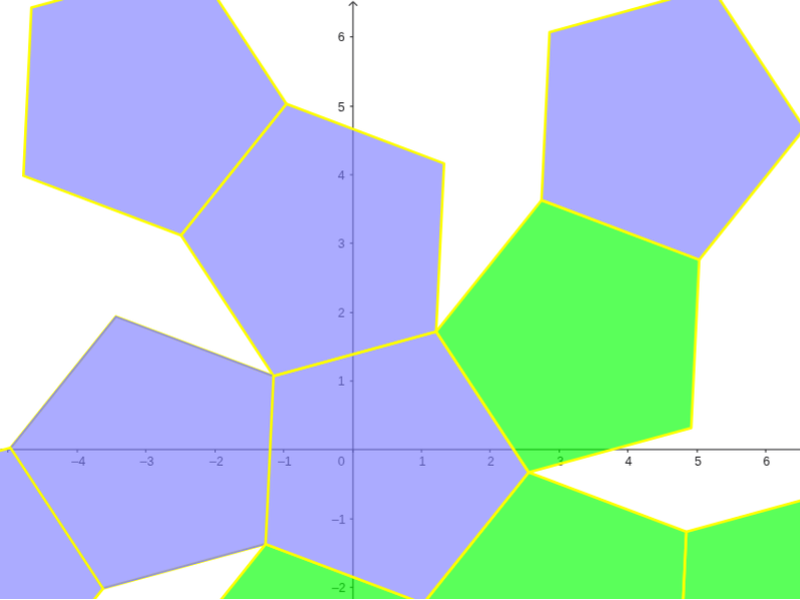
This example demonstrates the net of a dodecahedron half pyramid. It involves core mathematical concepts like polygons, solid geometry, and geometric construction. The construction utilizes GeoGebra commands/objects such as Point, Dodecahedron, Segment, Rotate, Circle, Center, OrthogonalLine, Polygon, and TableText. It is suitable for high school and above students learning solid geometry and geometric construction.
GeoGebra Commands & Parameters
Point(Circle[(((1 - sqrt(5)) * A) + ((3 + sqrt(5)) * B)) / 4, (Distance[A, B] * sqrt(10 + (2 * sqrt(5))) / 4), Segment[A, B]]) → CDodecahedron(A, B, C) → a, D, M, N, O, P, Q, R, S, T, faceABCDE, faceAEIOJ, E, faceABFKJ, faceBCGLF, faceCDHMG, faceDEINH, faceINSTO, faceJKPTO, faceFKPQL, faceGLQRM, faceHMRSN, facePQRST, F, edgeAE, edgeAB, edgeBC, edgeCD, edgeDE, edgeAJ, edgeEI, edgeIO, edgeJO, edgeJK, G, edgeFK, edgeBF, edgeFL, edgeGL, edgeCG, edgeGM, edgeHM, edgeDH, edgeHN, edgeIN, H, edgeNS, edgeST, edgeOT, edgePT, edgeKP, edgePQ, edgeLQ, edgeQR, edgeMR, edgeRS, I, J, K, LSegment(U, U + (0, 0, 2)) → bPoint(b) → VRotate(Polygon[A, B, F, K, J], (α * t), Segment[A, B]) → poly1Rotate(Polygon[F, K, P, Q, L], (α * t), Segment[K, F]) → poly2Rotate(Polygon[P, Q, R, S, T], (α * t), Segment[P, Q]) → poly3Rotate(poly2, (α * t), Segment[A, B]) → poly2'Rotate(poly3, (α * t), Segment[K, F]) → poly3'Rotate(poly3', (α * t), Segment[A, B]) → poly3''Circle(A, B, D) → cCenter(c) → WOrthogonalLine(W, Plane[A, B, D]) → dRotate(poly1, 72*°, d) → poly1'Rotate(poly1', 72*°, d) → poly1''Rotate(poly1'', 72*°, d) → poly1'''Rotate(poly1''', 72*°, d) → poly4Rotate(poly2', 72*°, d) → poly2''Rotate(poly2'', 72*°, d) → poly2'''Rotate(poly2''', 72*°, d) → poly5Rotate(poly5, 72*°, d) → poly5'Polygon(A, B, C, D, E) → poly6, a_1, b_1, c_1, d_1, eTableText({{LaTeX[A, true, true]}, {LaTeX[B, true, true]}, {LaTeX[C, true, true]}, {LaTeX[D, true, true]}, {LaTeX[E, true, true]}, {LaTeX[F, true, true]}, {LaTeX[G, true, true]}, {LaTeX[H, true, true]}, {LaTeX[I, true, true]}, {LaTeX[J, true, true]}, {LaTeX[K, true, true]}, {LaTeX[L, true, true]}, {LaTeX[M, true, true]}, {LaTeX[N, true, true]}, {LaTeX[O, true, true]}, {LaTeX[P, true, true]}, {LaTeX[Q, true, true]}, {LaTeX[R, true, true]}, {LaTeX[S, true, true]}, {LaTeX[T, true, true]}, {LaTeX[U, true, true]}, {LaTeX[V, true, true]}, {LaTeX[W, true, true]}}) → text1Rotate(poly2''', 72*°, d) → poly7Rotate(poly1'', 72*°, d) → poly1'''_1Polygon(A, B, C, D, E) → poly8, a_2, b_2, c_2, d_2, e_1Rotate(poly1''', 72*°, d) → poly9Rotate(poly5, 72*°, d) → poly5'_1Rotate(Polygon[A, B, F, K, J], (α * t), Segment[A, B]) → poly10Rotate(poly2, (α * t), Segment[A, B]) → poly2'_1Rotate(poly3', (α * t), Segment[A, B]) → poly3''_1Rotate(poly1, 72*°, d) → poly1'_1Rotate(poly2', 72*°, d) → poly2''_1Rotate(poly1', 72*°, d) → poly1''_1Rotate(poly2'', 72*°, d) → poly2'''_1
AI Drawing Prompt Reference
Draw the net of a half dodecahedron pyramid, featuring twelve pentagonal faces connected at a central point forming a star shape, with rotations and folds showing the pyramid's 3D structure, highlighting key points like the center, vertices, and connecting lines, starting with basic pentagons and rotating to form other faces.
The prompt above was compiled from the original drawing commands and is for reference only.