
Do You Recognize These Geometric Figures?
Loading the math board and drawing, please wait…
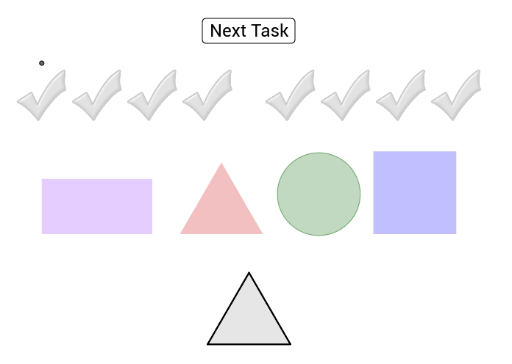
① This interactive drag-and-drop example demonstrates how to match colored geometric figures onto grey outlines, helping learners visually recognize common 2D and 3D shapes. ② Core math concepts include circles, rectangles, squares, cylinders, scalene triangles, and 3D vectors, focusing on shape classification and spatial reasoning. ③ Construction details: Using GeoGebra commands such as Circle, Polygon, Segment, OrthogonalLine, and Intersect, multiple objects (points A, B, C, D, E, F, etc., and polygons Vieleck1, Vieleck2, Vieleck3) are created, with drag interactions enabling the matching activity. ④ Suitable for elementary to middle school geometry introduction, special education, or gamified learning, enhancing observation and shape recognition skills.
GeoGebra Commands & Parameters
Circle(E, 1.5) → eCircle(I, 1.5) → gPolygon(K, L, 4) → Vieleck1, h, i, j, k, M, NPolygon(O, P, 4) → Vieleck2, l, m, n, p, Q, RPolygon(S, T, 4) → Vieleck3, q, r, s, t, U, VPolygon(W, Z, 4) → Vieleck4, a, b, f_1, g_1, A_1, B_1Polygon(C_1, D_1, 4) → Vieleck5, h_1, i_1, j_1, k_1, E_1, F_1Polygon(G_1, H_1, 3) → Vieleck6, l_1, m_1, n_1, I_1Polygon(J_1, K_1, 3) → Vieleck7, p_1, q_1, r_1, L_1Polygon(M_1, N_1, 3) → Vieleck8, s_1, t_1, a_1, O_1Polygon(P_1, Q_1, 3) → Vieleck9, b_1, c_1, d_1, R_1Polygon(S_1, T_1, 3) → Vieleck10, e_1, f_2, g_2, U_1Segment(V_1, W_1) → h_2Segment(Z_1, A_2) → i_2Segment(B_2, C_2) → j_2Segment(D_2, E_2) → k_2Segment(F_2, G_2) → l_2OrthogonalLine(W_1, h_2) → m_2OrthogonalLine(A_2, i_2) → n_2OrthogonalLine(C_2, j_2) → p_2OrthogonalLine(E_2, k_2) → q_2OrthogonalLine(G_2, l_2) → r_2OrthogonalLine(V_1, h_2) → s_2OrthogonalLine(Z_1, i_2) → t_2OrthogonalLine(B_2, j_2) → a_2OrthogonalLine(D_2, k_2) → b_2OrthogonalLine(F_2, l_2) → c_2Circle(G_2, (0.5 * Distance[F_2, G_2])) → d_2Circle(E_2, (0.5 * Distance[D_2, E_2])) → e_2Circle(C_2, (0.5 * Distance[B_2, C_2])) → c_3Circle(A_2, (0.5 * Distance[Z_1, A_2])) → d_3Circle(W_1, (0.5 * Distance[V_1, W_1])) → e_3Intersect(e_3, m_2, 2) → H_2Intersect(d_3, n_2, 2) → I_2Intersect(c_3, p_2, 2) → J_2Intersect(e_2, q_2, 2) → K_2Intersect(d_2, r_2, 2) → L_2OrthogonalLine(H_2, m_2) → f_3OrthogonalLine(I_2, n_2) → g_3OrthogonalLine(J_2, p_2) → h_3OrthogonalLine(K_2, q_2) → i_3OrthogonalLine(L_2, r_2) → j_3Intersect(s_2, f_3) → M_2Intersect(t_2, g_3) → N_2Intersect(a_2, h_3) → O_2Intersect(b_2, i_3) → P_2Intersect(c_2, j_3) → Q_2Polygon(V_1, W_1, H_2, M_2) → Vieleck11, v_1, w_1, h_4, m_3Polygon(Z_1, A_2, I_2, N_2) → Vieleck12, z_1, a_3, i_4, n_3Polygon(B_2, C_2, J_2, O_2) → Vieleck13, b_3, c_4, j_4, o_2Polygon(D_2, E_2, K_2, P_2) → Vieleck14, d_4, e_4, k_3, p_3Polygon(F_2, G_2, L_2, Q_2) → Vieleck15, f_4, g_4, l_3, q_3Circle(R_2, 1.5) → r_3Polygon(T_2, U_2, 4) → Namepolygon1, s_3, t_3, k_4, l_4, V_2, W_2Polygon(Z_2, A_3, 3) → Namepolygon2, m_4, n_4, p_4, B_3Segment(C_3, D_3) → q_4OrthogonalLine(D_3, q_4) → r_4OrthogonalLine(C_3, q_4) → s_4Circle(D_3, (0.5 * Distance[C_3, D_3])) → t_4Intersect(t_4, r_4, 2) → E_3OrthogonalLine(E_3, r_4) → a_4Intersect(s_4, a_4) → F_3Polygon(C_3, D_3, E_3, F_3) → Namepolygon3, c_5, d_5, e_5, f_5Polygon(A_4, B_4, 3) → Vieleck16, b_4, g_5, h_5, C_4Polygon(D_4, E_4, 3) → Vieleck17, i_5, j_5, k_5, F_4Polygon(G_4, H_4, 3) → Vieleck18, l_5, m_5, n_5, I_4Polygon(J_4, K_4, 3) → Vieleck19, p_5, q_5, r_5, L_4Circle(O_4, 1.5) → t_5Polygon(A_5, B_5, 4) → Vieleck21, h_6, i_6, j_6, k_6, C_5, D_5Polygon(E_5, F_5, 4) → Vieleck22, l_6, m_6, n_6, p_6, G_5, H_5Polygon(W_4, Z_4, 4) → Vieleck20, a_5, b_5, f_6, g_6, M_5, N_5Segment(O_5, P_5) → a_6Segment(Q_5, R_5) → b_6Segment(S_5, T_5) → e_6Segment(U_5, V_5) → f_7OrthogonalLine(P_5, a_6) → g_7OrthogonalLine(O_5, a_6) → h_7OrthogonalLine(Q_5, b_6) → i_7OrthogonalLine(R_5, b_6) → j_7OrthogonalLine(S_5, e_6) → k_7OrthogonalLine(T_5, e_6) → l_7OrthogonalLine(U_5, f_7) → m_7OrthogonalLine(V_5, f_7) → n_7Circle(P_5, (0.5 * Distance[O_5, P_5])) → c_7Circle(R_5, (0.5 * Distance[Q_5, R_5])) → d_7Circle(T_5, (0.5 * Distance[S_5, T_5])) → e_7Circle(V_5, (0.5 * Distance[U_5, V_5])) → p_7Intersect(c_7, g_7, 2) → W_5Intersect(d_7, j_7, 2) → Z_5Intersect(e_7, l_7, 2) → A_6Intersect(p_7, n_7, 2) → B_6OrthogonalLine(W_5, g_7) → q_7OrthogonalLine(Z_5, j_7) → r_7OrthogonalLine(A_6, l_7) → s_7OrthogonalLine(B_6, n_7) → t_7Intersect(h_7, q_7) → C_6Intersect(i_7, r_7) → D_6Intersect(k_7, s_7) → E_6Intersect(m_7, t_7) → F_6Polygon(O_5, P_5, W_5, C_6) → Vieleck24, o_5, p_8, w_5, c_8Polygon(Q_5, R_5, Z_5, D_6) → Vieleck25, q_8, r_8, z_5, d_8Polygon(S_5, T_5, A_6, E_6) → Vieleck26, s_8, t_8, a_7, e_8Polygon(U_5, V_5, B_6, F_6) → Vieleck27, u_5, v_5, b_7, f_8Polygon(C_3, D_3, L_2, Q_2) → Vieleck23, c_9, d_9, l_8, q_6Polygon(K_5, L_5, 4) → Vieleck28, r_6, s_6, t_6, g_8, G_6, H_6Polygon(I_6, J_6, 4) → Vieleck29, h_8, i_8, j_8, k_8, K_6, L_6Circle(A, 1.5) → cCircle(Q_4, 1.5) → c_6Circle(C, 1.5) → dCircle(S_4, 1.5) → d_6Circle(G, 1.5) → fCircle(M_4, 1.5) → s_5
AI Drawing Prompt Reference
Draw a shape containing 10 different figures, including 2 circles, 2 squares, 2 pentagons, 2 hexagons, and 2 triangles. Start by drawing 2 circles, then 4 squares, followed by 2 pentagons, 2 hexagons, and 2 triangles. Finally, use the squares and circles to form a closed polygon.
The prompt above was compiled from the original drawing commands and is for reference only.