
Division of a Decimal by a Power of 10
Loading the math board and drawing, please wait…
In collections
Decimals
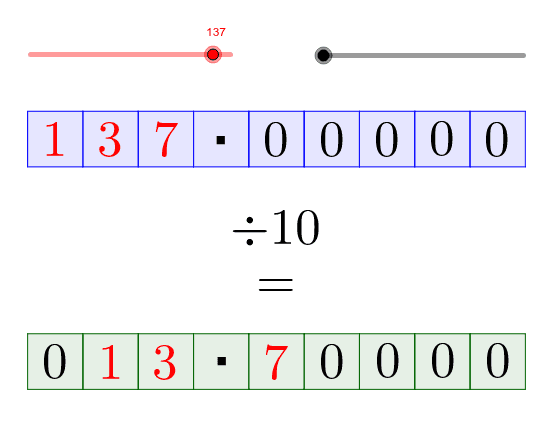
This example demonstrates the process of dividing a decimal by a power of 10. Key math concepts include decimal operations, exponentiation, and the decimal place value system. It is constructed using GeoGebra commands like Polygon, Line, and Intersect. Suitable for middle school mathematics education, helping students understand the relationship between decimal division, exponentiation, and the rules of decimal place value changes.
GeoGebra Commands & Parameters
Polygon(A, B, C, D) → poly1, a_1, b_1, c_1, d_1Polygon(D, E, F, C) → poly2, d_2, e, f, c_2Polygon(E, G, I, F) → poly3, e_1, g, i, f_1Polygon(G, J, K, I) → poly4, g_1, j, k, i_1Polygon(J, L, M, K) → poly5, j_1, l, m, k_1Polygon(L, N, O, M) → poly6, l_1, n, o, m_1Polygon(N, P, Q, O) → poly7, n_1, p, q, o_1Polygon(P, R, S, Q) → poly8, p_1, r, s, q_1Polygon(R, V, W, S) → poly9, r_1, v, w, s_1Line(A, B) → hLine(C, D) → tLine(F, E) → h_1Line(I, G) → t_1Line(K, J) → f_2Line(M, L) → g_2Line(O, N) → h_2Line(Q, P) → i_2Line(S, R) → j_2Line(W, V) → k_2Intersect(h, l_2) → ZIntersect(t, l_2) → A_1Intersect(t, m_2) → B_1Intersect(h, m_2) → C_1Polygon(Z, A_1, B_1, C_1) → poly10, z_1, a_2, b_2, c_3Intersect(h_1, l_2) → D_1Intersect(h_1, m_2) → E_1Polygon(A_1, D_1, E_1, B_1) → poly11, a_3, d_3, e_2, b_3Intersect(t_1, l_2) → F_1Intersect(t_1, m_2) → G_1Polygon(D_1, F_1, G_1, E_1) → poly12, d_4, f_3, g_3, e_3Intersect(f_2, l_2) → H_1Intersect(f_2, m_2) → I_1Polygon(F_1, H_1, I_1, G_1) → poly13, f_4, h_3, i_3, g_4Intersect(g_2, l_2) → J_1Intersect(g_2, m_2) → K_1Polygon(H_1, J_1, K_1, I_1) → poly14, h_4, j_3, k_3, i_4Intersect(h_2, l_2) → L_1Intersect(h_2, m_2) → M_1Polygon(J_1, L_1, M_1, K_1) → poly15, j_4, l_3, m_3, k_4Intersect(i_2, l_2) → N_1Intersect(i_2, m_2) → O_1Polygon(L_1, N_1, O_1, M_1) → poly16, l_4, n_2, o_2, m_4Intersect(j_2, l_2) → P_1Intersect(j_2, m_2) → Q_1Polygon(N_1, P_1, Q_1, O_1) → poly17, n_3, p_2, q_2, o_3Intersect(k_2, l_2) → R_1Intersect(k_2, m_2) → S_1Polygon(P_1, R_1, S_1, Q_1) → poly18, p_3, r_2, s_2, q_3
AI Drawing Prompt Reference
Draw a complex geometric structure composed of multiple quadrilaterals, connected by lines. Start by drawing four large quadrilaterals, then draw smaller quadrilaterals inside each, connecting them through intersection points to form a multi-layered geometric shape.
The prompt above was compiled from the original drawing commands and is for reference only.