
Distance Between Two Points by RV'SMath
Loading the math board and drawing, please wait…
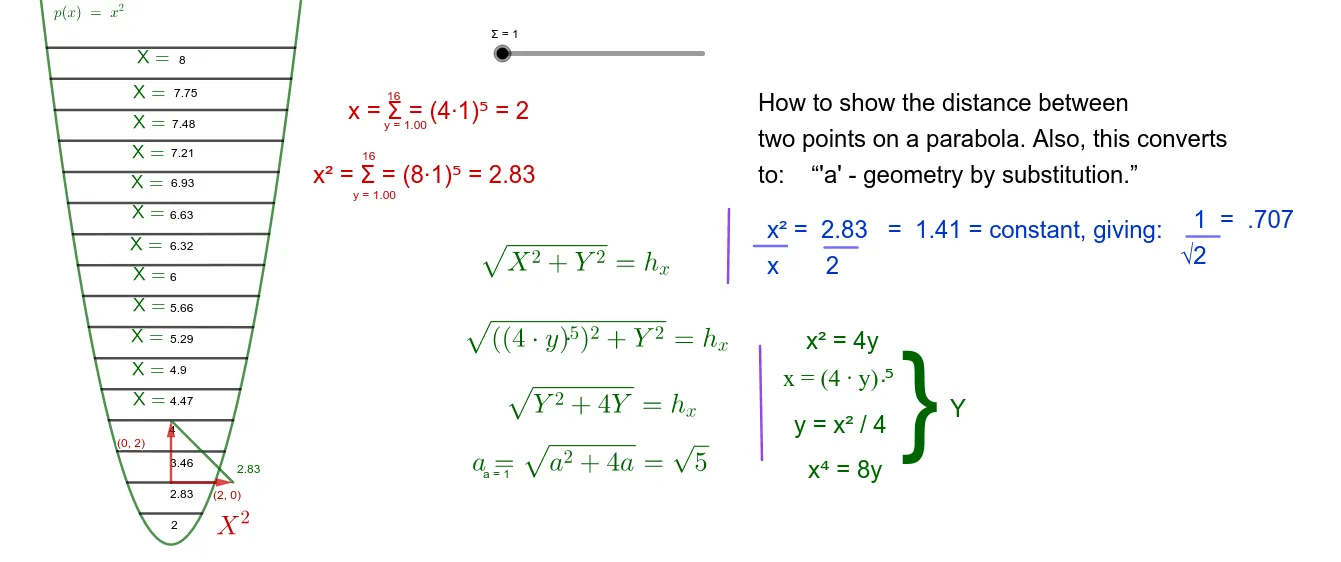
This example demonstrates how to use GeoGebra to show the distance between two points. Key mathematical concepts include the distance formula and vectors. Commands such as Segment, Point, Vector, and Rotate are used to construct the distance. Suitable for students learning coordinate geometry.
GeoGebra Commands & Parameters
Segment(A, B) → fSegment(B, C) → gSegment(C, A) → hSegment(D, E) → iPoint(p) → FPoint(p) → GPoint(p) → HPoint(p) → ISegment(H, I) → jSegment(F, G) → kPoint(p) → JPoint(p) → KSegment(K, J) → lPoint(p) → LPoint(p) → MSegment(M, L) → mPoint(p) → NPoint(p) → OSegment(N, O) → nPoint(p) → RPoint(p) → SSegment(R, S) → rPoint(p) → TPoint(p) → USegment(T, U) → sPoint(p) → VPoint(p) → WSegment(V, W) → tPoint(p) → ZPoint(f) → A_1Segment(Z, A_1) → bPoint(p) → B_1Point(p) → C_1Segment(B_1, C_1) → cPoint(p) → D_1Point(p) → E_1Segment(D_1, E_1) → dPoint(Circle[P, 6.93]) → QSegment(P, Q) → qVector((0, 2), (((4 * Σ))^(0.5), 2)) → uPoint(j) → H_1Rotate(u, 90°, H_1) → u'Point(u') → I_1Point(u) → J_1Segment(I_1, J_1) → f_1Point(p) → K_1Point(p) → L_1Point(p) → M_1Point(p) → N_1Point(p) → O_1Point(p) → P_1Point(p) → Q_1Point(p) → S_1Segment(K_1, L_1) → g_1Segment(M_1, N_1) → h_1Segment(O_1, P_1) → i_1Segment(Q_1, S_1) → j_1Segment(R_1, T_1) → k_1Segment(U_1, V_1) → l_1Segment(W_1, Z_1) → m_1Segment(W_2, Z_2) → m_2Segment(W_3, Z_3) → m_3Segment(A_2, B_2) → n_1
AI Drawing Prompt Reference
Draw a diagram showing the distance between two points. Include points A and B connected by a line segment. Add a circle with center P and radius 6.93. Also include a vector u rotated to u'. Connect I_1 and J_1 to form line segment f_1. The diagram should clearly illustrate the distance formula and vector rotation concepts, suitable for learning coordinate geometry.
The prompt above was compiled from the original drawing commands and is for reference only.