
Dissecting Rectangles into Squares via Geometric Transforms
Loading the math board and drawing, please wait…
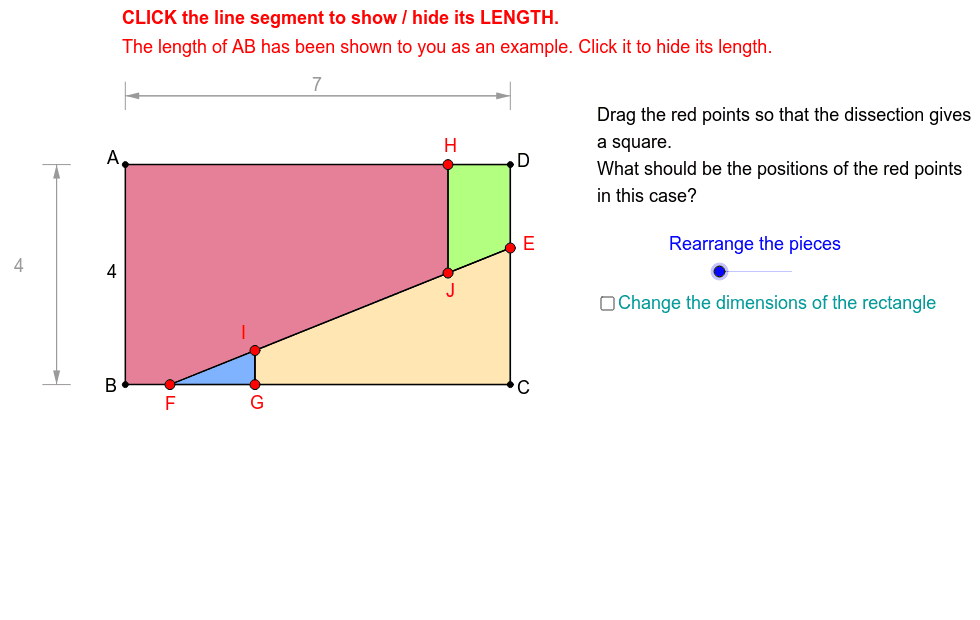
This GeoGebra interactive example demonstrates the step-by-step geometric dissection and rearrangement of a rectangle into an equivalent square of equal area. The core mathematical concepts involved include geometric dissection, area conservation, geometric transformations (specifically translation and rotation), and the properties of quadrilaterals. To construct this dynamic model, various GeoGebra commands are utilized, including `Sequence` to generate point lists, `Polygon` and `Segment` to draw the boundaries, and `Rotate`, `Translate`, `Intersect`, `Midpoint`, `Vector`, and `Distance` to manipulate vertices like A, B, C, D, E, F, G, H, I, J and their transformed counterparts. The construction dynamically updates polygons `poly1`, `poly2`, and `poly3` to visualize the cutting lines and the final square assembly. This resource is highly suitable for high school geometry classes, university-level introductory topology or geometry courses, and math clubs looking to explore geometric constructions, visual proofs, and spatial reasoning.
GeoGebra Commands & Parameters
Sequence((x(A), y(A) - 3 - 0.1 * i), i, 0, 50) → list2Point(list2) → B''Sequence((x(A) + 3 + 0.1 * i, y(A)), i, 0, 50) → list1Point(list1) → D''Polygon(A, B, C, D) → poly1, a, b, c, dPoint(c) → EPoint(b) → FSegment(E, F) → ePoint(Segment[F, C]) → GPoint(d) → HPoint(e) → IPoint(e) → JSegment(G, I) → GISegment(H, J) → HJPolygon(A, B, F, J, H) → poly2, a_1, b_1, f_1, j, hRotate(D, -α, J) → D'Rotate(E, -α, J) → E'Rotate(J, -α, J) → J'Rotate(H, -α, J) → H'Polygon(D', E', J', H') → poly3, d', e', j', h'Translate(C, Vector[E, E']) → C'Translate(E, Vector[E, E']) → E'_1Translate(I, Vector[E, E']) → I'Translate(G, Vector[E, E']) → G'Polygon(C', E'_1, I', G') → poly4, c', e'_1, i', g'Rotate(F, -α, F) → F'Rotate(G, -α, F) → G'_1Rotate(I, -α, F) → I'_1Polygon(F', G'_1, I'_1) → poly5, i'_1, f', g'_1Intersect(Circle[D, Distance[F, B]], d) → H_1,Intersect(Circle[A, sqrt(a * b)], d) → H_2,Intersect(Circle[F, Distance[B, F]], Ray[F, C]) → G_1,Midpoint(C, D) → MIntersect(Circle[B, Distance[D, H]], b) → F_1, K_2Segment(A - (1, 0), A - (1.5, 0)) → iTranslate(i, Vector[A, A - (0, y(A) - y(C'))]) → i'_2Segment(A + (0, 1), A + (0, 1.5)) → kTranslate(k, Vector[A, A + (Max[x(H'), x(D')] - x(A), 0)]) → k'Midpoint(k) → LMidpoint(k') → NMidpoint(i) → OMidpoint(i'_2) → PVector(L, N) → uVector(N, L) → vVector(O, P) → wVector(P, O) → zMidpoint(O, P) → QMidpoint(L, N) → RIntersect(OrthogonalLine[G_1, b], e) → I_1Intersect(OrthogonalLine[H_1, d], e) → J_1Intersect(OrthogonalLine[H_2, d], e) → J_2Segment(A, H) → AHSegment(H, D) → HDSegment(A, B) → ABSegment(B, F) → BFSegment(D, E) → DESegment(E, C) → ECSegment(F, G) → FGSegment(G, C) → GCSegment(F, I) → FISegment(I, J) → IJSegment(J, E) → JEMidpoint(HD) → KDistance(D, H) → DHMidpoint(DE) → SMidpoint(EC) → TMidpoint(GC) → UMidpoint(FG) → VMidpoint(BF) → WMidpoint(AH) → ZMidpoint(AB) → A_1Midpoint(HJ) → B_1Midpoint(FI) → C_1Midpoint(IJ) → D_1Midpoint(JE) → E_1Midpoint(GI) → K_1Intersect(Circle[F, Distance[E, J]], e) → I_2,Intersect(Circle[E, Distance[F, I]], e) → J_3,
AI Drawing Prompt Reference
Draw a rectangle that is dissected and rearranged into a square of equal area. Inside the rectangle, pick a point on one side and draw a slanted segment to the opposite side, then from another vertex draw a perpendicular to that slanted segment, creating cutting lines. Rotate one part around a specific vertex and translate another part along a vector so that they assemble into a square. Show the original rectangle, the cutting lines, the rotated polygon, the translated polygon, and arrows indicating the directions of rotation and translation. Mark all key intersection points, and include auxiliary circles and perpendicular lines to illustrate the construction process.
The prompt above was compiled from the original drawing commands and is for reference only.