
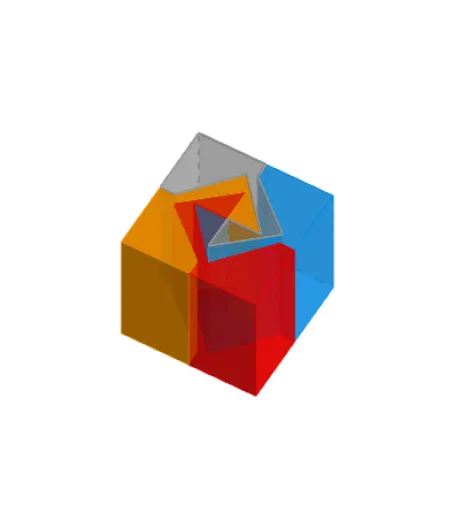
Dissecting a Cube into 4 Equal Parts
Loading the math board and drawing, please wait…
① Demonstrates how a cube can be dissected into four congruent parts using geometric transformations. ② Core concepts include solid geometry, geometric transformations (reflection, rotation, translation), similarity transformations, and vectors. ③ Construction highlights: commands such as Intersect, Point, Polygon, Midpoint, Segment, Circle, LineBisector, Line, Mirror, Rotate, Prism, Vector, and Translate are employed to create vertices, edges, faces, midpoints, mirrored and rotated objects. ④ Suitable for high‑school solid geometry lessons, geometric construction practice, and university‑level geometry demonstrations.
GeoGebra Commands & Parameters
Intersect(xAxis, yAxis) → APoint(xAxis) → EPolygon(E, F, 4) → poly2, j, k, l, m, G, HMidpoint(j) → LMidpoint(l) → KSegment(K, L) → pPoint(p) → UPoint(p) → TMidpoint(U, T) → H_1Circle(H_1, 0.95) → d_2LineBisector(T, U) → eIntersect(d_2, e, 2) → I_1Segment(H_1, I_1) → l_1Polygon(A, B, 4) → poly1, f, g, h, i, C, DMidpoint(h) → IMidpoint(f) → JSegment(I, J) → nPoint(n) → MMidpoint(I, J) → NCircle(M, 0.2) → cIntersect(c, n, 2) → OLine(M, h) → qLine(O, q) → rPoint(q) → PLine(P, n) → sIntersect(r, s) → QMirror(P, N) → P'Mirror(Q, N) → Q'Mirror(O, N) → O'Mirror(M, N) → M'Polygon(D, I, J, A, M, P, Q, O, O', Q', P', M') → poly3, d, m', j_1, a, i_1, m_1, p_1, q_1, o, o', q', p'Polygon(C, I, J, B, M, P, Q, O, O', Q', P', M') → poly4, c_1, m'_1, j_2, b, i_2, m_2, p_2, q_2, o_1, o'_1, q'_1, p'_1Midpoint(m) → RMidpoint(k) → SSegment(R, S) → tIntersect(t, p) → WRotate(T, 90°, W) → T'Point(l_1) → VRotate(V, 90°, W) → V'Rotate(U, 90°, W) → U'Polygon(K, H, R, T', V', U', W, U, V, T) → poly5, k_1, t_1, h_1, r_1, t', v', u', w, u_3, vRotate(K, 90°, W) → K'Rotate(H, 90°, W) → H'Rotate(R, 90°, W) → R'Rotate(T', 90°, W) → T''Rotate(V', 90°, W) → V''Rotate(U', 90°, W) → U''Rotate(W, 90°, W) → W'Rotate(U, 90°, W) → U'_1Rotate(V, 90°, W) → V'_1Rotate(T, 90°, W) → T'_1Polygon(K', H', R', T'', V'', U'', W', U'_1, V'_1, T'_1) → poly5', k', t'_1, h', r', t'', v'', u'', w', u'_1, v'_1Rotate(K', 90°, W) → K''Rotate(H', 90°, W) → H''Rotate(R', 90°, W) → R''Rotate(T'', 90°, W) → T'''Rotate(V'', 90°, W) → V'''Rotate(U'', 90°, W) → U'''Rotate(W', 90°, W) → W''Rotate(U'_1, 90°, W) → ZRotate(V'_1, 90°, W) → A_1Rotate(T'_1, 90°, W) → B_1Polygon(K'', H'', R'', T''', V''', U''', W'', Z, A_1, B_1) → poly5'', k'', b_1, h'', r'', t''', v''', u''', w'', z_1, a_1Rotate(K'', 90°, W) → K'''Rotate(H'', 90°, W) → H'''Rotate(R'', 90°, W) → R'''Rotate(T''', 90°, W) → C_1Rotate(V''', 90°, W) → D_1Rotate(U''', 90°, W) → E_1Rotate(W'', 90°, W) → W'''Rotate(Z, 90°, W) → Z'Rotate(A_1, 90°, W) → F_1Rotate(B_1, 90°, W) → G_1Polygon(K''', H''', R''', C_1, D_1, E_1, W''', Z', F_1, G_1) → poly5''', k''', g_1, h''', r''', c_2, d_1, e_1, w''', z', f_1Prism(poly5, n_1) → prism1, R_1, C_2, face12, face13, face15, face20, face21, face19, face18, face17, face16, S_1, face14, face22, edge22, edge21, edge23, edge28, edge29, edge30, edge27, edge25, T_1, edge26, edge24, edge31, edge33, edge34, edge35, edge36, edge37, edge38, edge39, U_1, edge40, edge32, V_1, W_1, Z_1, A_2, B_2Segment(W, K_1) → s_1Segment(W, L_1) → f_2Circle(W, (a_2 * s_1)) → e_2Intersect(s_1, e_2, 1) → M_1Intersect(f_2, e_2, 1) → N_1Vector(W, M_1) → uVector(W, N_1) → u_1Translate(prism1, Vector[(-u_1)]) → prism1'Prism(poly5''', b_2) → prism2, K_2, T_2, face23, face25, face26, face27, face28, face29, face30, face31, face32, L_2, face24, face33, edge41, edge42, edge43, edge44, edge45, edge46, edge47, edge48, M_2, edge49, edge50, edge51, edge53, edge54, edge55, edge56, edge57, edge58, edge59, N_2, edge60, edge52, O_2, P_2, Q_2, R_2, S_2Translate(prism2, u) → prism2'Prism(poly5', g_2) → prism4, U_2, F_3, face34, face36, face37, face38, face39, face40, face41, face42, face43, V_2, face35, face44, edge61, edge62, edge63, edge64, edge65, edge66, edge67, edge68, W_2, edge69, edge70, edge71, edge73, edge74, edge75, edge76, edge77, edge78, edge79, Z_2, edge80, edge72, A_3, B_3, C_3, D_3, E_3Prism(poly5'', k_2) → prism3, G_3, P_3, face45, face47, face48, face49, face50, face51, face52, face53, face54, H_3, face46, face55, edge81, edge82, edge83, edge84, edge85, edge86, edge87, edge88, I_3, edge89, edge90, edge91, edge93, edge94, edge95, edge96, edge97, edge98, edge99, J_3, edge100, edge92, K_3, L_3, M_3, N_3, O_3Translate(prism3, u_1) → prism3'Translate(prism4, Vector[(-u)]) → prism4'
AI Drawing Prompt Reference
Draw a cube and dissect it into four congruent parts. Start by creating the cube's vertices and edges using transformations like reflection, rotation, and translation. Then, use midpoints, segments, and circles to construct the cube's faces and division lines. Finally, apply mirroring and rotation to divide the cube into four congruent parts.
The prompt above was compiled from the original drawing commands and is for reference only.