
Dissecting a Cube for a Regular Tetrahedron
Loading the math board and drawing, please wait…
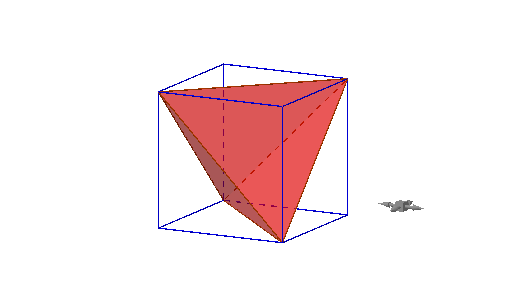
①This example demonstrates how to dissect a cube to construct an inscribed regular tetrahedron, revealing the spatial relationship between these two polyhedra. ②Core mathematical concepts include solid geometry, polyhedral dissection, vertex relationships between a cube and a regular tetrahedron, spatial intersections, and the use of quadratic curves (parabolas) as auxiliary construction aids. ③Construction highlights: using GeoGebra commands such as Intersect to find intersection points, Cube to generate the cube, and Polygon to define faces and dissection polygons; objects include the cube's eight vertices (A-H), six faces (faceABCD, faceADHE, etc.), twelve edges (edgeAD, edgeAB, etc.), intersection point I, and multiple auxiliary polygons (poly1, poly2, poly3), along with function objects f, c, h. ④Suitable for high school and above, this example aids in learning spatial geometry, enhancing spatial reasoning, or serving as a dynamic teaching tool for polyhedral dissection.
GeoGebra Commands & Parameters
Intersect(zAxis, xOyPlane) → APoint(xAxis) → BPoint(Circle[B, Distance[A, B], Segment[A, B]]) → CCube(A, B, C) → a, D, faceCDHG, faceEFGH, edgeAD, edgeAB, edgeBC, edgeCD, edgeAE, edgeDH, edgeEH, edgeEF, E, edgeBF, edgeFG, edgeCG, edgeGH, F, G, H, faceABCD, faceADHE, faceABFE, faceBCGFPolygon(F, C, H) → poly1, h, f, cPolygon(F, A, C) → poly2, c_1, f_1, a_1Intersect(edgeEH, f) → IPolygon(C, H, A) → poly3, a_2, c_2, h_1Polygon(H, F, A) → poly4, a_3, h_2, f_2