
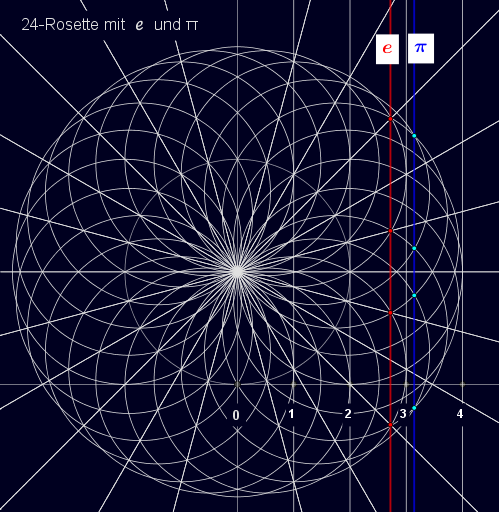
Display of e and π in 24-gon Rosette
Loading the math board and drawing, please wait…
This example demonstrates the application of e and π in a 24-gon rosette. It involves key mathematical concepts such as exponential functions, pi, and rotation. Using GeoGebra commands like Point, Intersect, Circle, Sequence, etc., specific geometric figures are constructed. Suitable for high school mathematics education and learning.
GeoGebra Commands & Parameters
Point(yAxis) → AIntersect(xAxis, yAxis) → BCircle(A, B) → cSequence((k, 0), k, 1, 4) → P, {(1, 0), (2, 0), (3, 0), (4, 0)}Sequence(x = k, k, 1, 4) → L, {x = 1, x = 2, x = 3, x = 4}Sequence(Circle[((2 * cos((k * π / 12))), 2 + (2 * sin((k * π / 12)))), 2], k, 0, 23) → K, {(x - 2)² + (y - 2)² = 4, (x - 1.9318516525781366)² + (y - 2.5176380902050415)² = 4, (x - 1.7320508075688774)² + (y - 3)² = 4, (x - 1.4142135623730951)² + (y - 3.414213562373095)² = 4, (x - 1.0000000000000002)² + (y - 3.732050807568877)² = 4, (x - 0.5176380902050419)² + (y - 3.9318516525781364)² = 4, x² + (y - 4)² = 4, (x + 0.5176380902050413)² + (y - 3.9318516525781364)² = 4, (x + 0.9999999999999996)² + (y - 3.7320508075688776)² = 4, (x + 1.414213562373095)² + (y - 3.414213562373095)² = 4, (x + 1.732050807568877)² + (y - 3.000000000000001)² = 4, (x + 1.9318516525781364)² + (y - 2.517638090205042)² = 4, (x + 2)² + (y - 2)² = 4, (x + 1.9318516525781368)² + (y - 1.4823619097949594)² = 4, (x + 1.7320508075688776)² + (y - 1.0000000000000004)² = 4, (x + 1.4142135623730958)² + (y - 0.5857864376269057)² = 4, (x + 1.0000000000000009)² + (y - 0.26794919243112303)² = 4, (x + 0.517638090205043)² + (y - 0.06814834742186382)² = 4, x² + y² = 4, (x - 0.5176380902050406)² + (y - 0.06814834742186315)² = 4, (x - 0.9999999999999987)² + (y - 0.2679491924311219)² = 4, (x - 1.4142135623730947)² + (y - 0.5857864376269046)² = 4, (x - 1.7320508075688767)² + (y - 0.9999999999999991)² = 4, (x - 1.9318516525781362)² + (y - 1.4823619097949567)² = 4}Sequence((tan((k * π / 12)) * x) + 2, k, 0, 23) → St, {(tan((0 * π / 12)) * x) + 2, (tan((1 * π / 12)) * x) + 2, (tan((2 * π / 12)) * x) + 2, (tan((3 * π / 12)) * x) + 2, (tan((4 * π / 12)) * x) + 2, (tan((5 * π / 12)) * x) + 2, (tan((6 * π / 12)) * x) + 2, (tan((7 * π / 12)) * x) + 2, (tan((8 * π / 12)) * x) + 2, (tan((9 * π / 12)) * x) + 2, (tan((10 * π / 12)) * x) + 2, (tan((11 * π / 12)) * x) + 2, (tan((12 * π / 12)) * x) + 2, (tan((13 * π / 12)) * x) + 2, (tan((14 * π / 12)) * x) + 2, (tan((15 * π / 12)) * x) + 2, (tan((16 * π / 12)) * x) + 2, (tan((17 * π / 12)) * x) + 2, (tan((18 * π / 12)) * x) + 2, (tan((19 * π / 12)) * x) + 2, (tan((20 * π / 12)) * x) + 2, (tan((21 * π / 12)) * x) + 2, (tan((22 * π / 12)) * x) + 2, (tan((23 * π / 12)) * x) + 2}Line(B, xAxis) → fOrthogonalLine(B, f) → gSequence(Text[k, P(k) + (-0.10, -0.6)], k, 1, 4) → T, {"1", "2", "3", "4"}Intersect(St(2, x), gl1) → S1Intersect(St(4, x), gl1) → S2Intersect(St(24, x), gl1) → S3Intersect(St(22, x), gl1) → S4Intersect(K(3), gl2) → T1, U1Intersect(K(23), gl2) → T2, U2
AI Drawing Prompt Reference
Draw a 24-point star rosette using e and π as key parameters. Start by drawing the x-axis and y-axis, then draw a circle centered on the y-axis. Mark four points on the x-axis representing 1 to 4. Using these points and π/12 multiples, construct 24 circles with a radius of 2, centered at points on the x-axis rotated by π/12. Then draw 24 lines passing through the origin with slopes tan(kπ/12), where k ranges from 0 to 23. Draw the intersection of the x-axis and y-axis, and a vertical line perpendicular to the x-axis. Label the intersection points of the circles and the vertical line with numbers 1 to 4. Finally, find the intersections of specific lines with the vertical line and connect these points to form the star rosette.
The prompt above was compiled from the original drawing commands and is for reference only.