
Display Cylinder with Given Axis and Radius
Loading the math board and drawing, please wait…
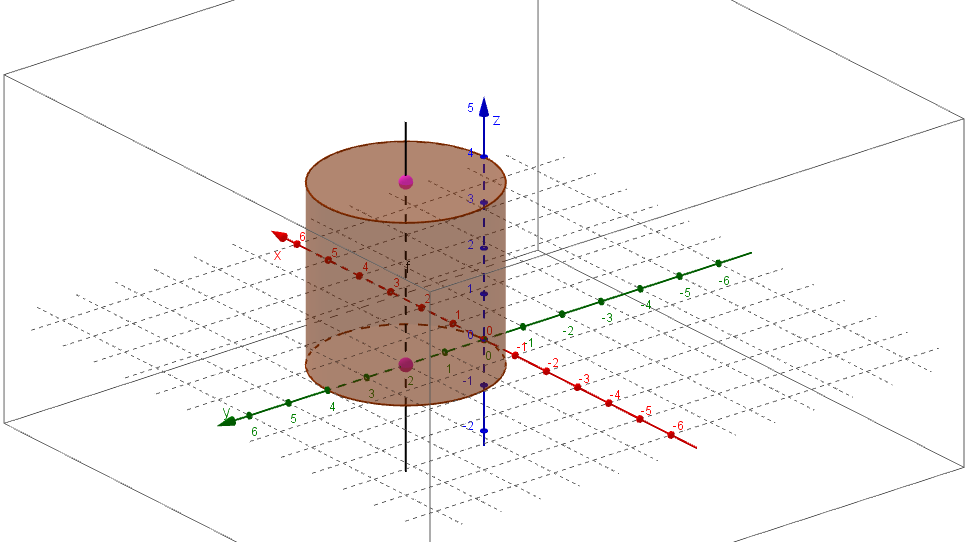
This example demonstrates how to use GeoGebra to draw a cylinder with a specified axis and radius. It involves core mathematical concepts such as solid geometry, vectors, and the representation of three-dimensional shapes. Key construction steps include using GeoGebra commands/objects like Textfield, Cylinder, and Line. Suitable for high school students and educators.
GeoGebra Commands & Parameters
Textfield(A) → InputBox1Textfield(B) → InputBox2Textfield() → InputBox3Textfield(r) → InputBox4Textfield(r) → InputBox5Cylinder(A, B, r) → a, c, d, bTextfield(r) → InputBox6Line(A, B) → f
AI Drawing Prompt Reference
Draw a cylinder with a specified axis and radius, where the axis is represented as a line, the cylinder is generated based on the axis and radius, and display the coordinates of the axis endpoints and the radius value as input.
The prompt above was compiled from the original drawing commands and is for reference only.