
Disdyakis Dodecahedron on a Sphere: 26 Vertices
Loading the math board and drawing, please wait…
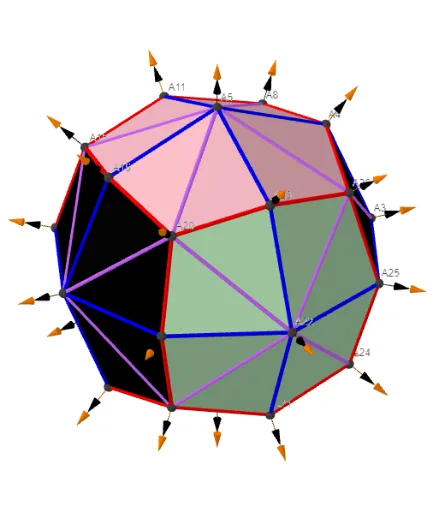
This example demonstrates how to construct and visualize the Disdyakis dodecahedron in 3D with its 26 vertices, emphasizing their placement on a sphere and the resulting edge/vertex structure. The key mathematical ideas are solid geometry in Euclidean space, sphere-based constraints (using the sphere as a geometric “container”), generating polyhedron vertices from symmetry/parameterized coordinate data, and representing spatial relationships with vectors and point-to-point segments. In GeoGebra, the construction is organized to batch-generate vertices and edges, map constructed coordinate/direction data onto the sphere, and annotate important information such as vertex indices or parameters. The construction uses commands highlighted in the provided summary—UnicodeToLetter, Text, Sum, Zip, Sphere, and TableText—together with objects like Points00, Segments, lVector1/lVector2/lVector3, and Cm to assemble and label the geometric components. Suitable for advanced high-school geometry, introductory university solid geometry, and GeoGebra-based STEM visualization tasks focused on polyhedra and 3D coordinate geometry.
GeoGebra Commands & Parameters
UnicodeToLetter(34) → u34Text("" + Um1) → txt_pSum(Flatten[Sequence[Append[Sequence[Element[txt_p, i], i, m01(k), m02(k)], " "], k, 1, 5]]) → txtUm1Zip(Vector[a, a + UnitVector[a]], a, Points00) → lVector1Zip(Vector[a, a + (1.5 * UnitVector[b])], a, Points00, b, Wi_Pc) → lVector2Zip(Vector[a, a + (1.5 * UnitVector[b])], a, Points00, b, Wi_P) → lVector3Sphere((0, 0, 0), 5) → sphTableText(Append["i", 1…n], Append[" \fgcolor{orange}{GM :Δφ_i}, rad", l1w], Append["\fgcolor{magenta}{GC :Δφ_i} , rad", l1cw], "v") → text23rZip(Segment[Element[Points00, y(a)], Element[Points00, z(a)]], a, ll1bb(1)) → ll1Zip(Segment[Element[Points00, y(a)], Element[Points00, z(a)]], a, ll1bb(2)) → ll2Zip(Segment[Element[Points00, y(a)], Element[Points00, z(a)]], a, ll1bb(3)) → ll3Zip(Segment[Element[Points00, y(a)], Element[Points00, z(a)]], a, ll1bb(4)) → ll4Zip(Segment[Element[Points00, y(a)], Element[Points00, z(a)]], a, ll1bb(5)) → ll5Zip(Segment[Element[Points00, y(a)], Element[Points00, z(a)]], a, ll1bb(6)) → ll6Zip(Segment[Element[Points00, y(a)], Element[Points00, z(a)]], a, ll1bb(7)) → ll7Zip(Segment[Element[Points00, y(a)], Element[Points00, z(a)]], a, ll1bb(8)) → ll8Zip(Segment[Element[Points00, y(a)], Element[Points00, z(a)]], a, ll1bb(9)) → ll9Zip(Segment[Element[Points00, y(a)], Element[Points00, z(a)]], a, ll1bb(10)) → ll10
AI Drawing Prompt Reference
Draw a disdyakis dodecahedron in 3D space with all 26 vertices lying on a sphere of radius 5. From the sphere center, for each vertex generate three vector segments: one extending one unit length along the vertex direction, and two others extending 1.5 units along two parameter directions associated with that vertex. Connect adjacent vertices with line segments to form the polyhedron edges. Next to the sphere, add a table listing each vertex index and two angular differences in radians, with different colors for the two columns. Finally, label each vertex with its index number.
The prompt above was compiled from the original drawing commands and is for reference only.