
Discovering Ways to Name Angles
Loading the math board and drawing, please wait…
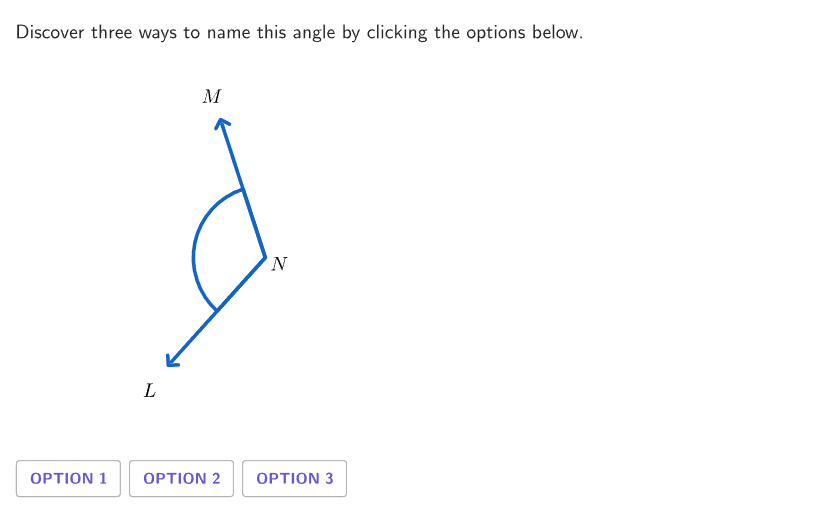
This interactive GeoGebra activity helps students explore the various ways to name an angle. It dynamically demonstrates how to identify and label the vertex, rays, and the interior/exterior of an angle, and practices using standard naming conventions (such as ∠ABC, ∠B, or ∠1) to refer to the same angle. The core mathematical concepts include the definition of an angle, vertex, rays, interior and exterior regions, and angle notation. In terms of construction, the activity uses GeoGebra commands like RandomUniform, Shuffle, Element, Rotate, Angle, Segment, and Text to generate random questions, construct dynamic angles, and provide interactive feedback with animation controls. It is designed for students in grades 4-5 as an introductory geometry exploration, suitable for classroom demonstration or self-paced learning to reinforce angle naming conventions.
GeoGebra Commands & Parameters
RandomUniform(0, 0.99, 100) → randomSeeds, {0.5364074778146228, 0.07293719234630995, 0.6558105856612284, 0.1879095103892114, 0.34696647036408573, 0.871710574919658, 0.8760713917568469, 0.6055467931776859, 0.054106328736049085, 0.7154553476847109, 0.4621152551122189, 0.03722658203278643, 0.6896185150674675, 0.9171371231045549, 0.9833455436648396, 0.000906524783188295, 0.08016242844575346, 0.09302027726869672, 0.15064252088226418, 0.6469643607057991, 0.9612231029893676, 0.15788668142104148, 0.807434653118208, 0.9314777293865618, 0.9710115536248342, 0.7075332675920692, 0.6086066778347011, 0.9846512507809203, 0.6217537512287657, 0.01209516617613843, 0.32015467744134884, 0.06914399465175639, 0.7454138466599244, 0.9867008932709131, 0.8081906501421221, 0.12585312533684054, 0.9101845711735207, 0.5561118566342889, 0.9662812798894622, 0.32969966496895725, 0.4630515681201741, 0.9773326958152545, 0.6751730468848088, 0.3351406876952174, 0.6024018261323624, 0.16870043519832237, 0.928711969541262, 0.18049631650005324, 0.3129945337345356, 0.8256696837003066, 0.26420978599233963, 0.06173392105240804, 0.8036509882704403, 0.3624069667492249, 0.7246387370133268, 0.020090997105848787, 0.10574405079973535, 0.32439183451532255, 0.33385639742375517, 0.783847080820788, 0.4179801706314279, 0.9404939144000288, 0.09456653162371063, 0.6826689647585056, 0.29006624639810163, 0.13345313770770562, 0.7519168398788593, 0.40325768798248945, 0.814641108760209, 0.5653384074782009, 0.06351382920160127, 0.05751467962906211, 0.8533257129967495, 0.5793924840936702, 0.3392047280298697, 0.5891230001985827, 0.8389083095465321, 0.25169305499968964, 0.5412311008633616, 0.0013046317021181142, 0.6615305924656102, 0.12526915455927146, 0.027303062728615622, 0.27756732308756554, 0.192277681949076, 0.6157078818766759, 0.9057732475498683, 0.32849504362827625, 0.04279978067534146, 0.800870970712629, 0.5634082947938219, 0.2510636015358086, 0.7445050975705944, 0.7881119540369537, 0.37226172950866254, 0.47257820031615017, 0.7554633368322298, 0.4103437492700415, 0.10284461567965787, 0.40913282310354027}Shuffle(Sequence[6]) → randomCase, {4, 2, 1, 6, 5, 3}Element({{"A", "B", "C"}, {"L", "M", "N"}, {"X", "Y", "Z"}}, indexLetter) → letterSetElement(randomCase, Mod[countQuestion, Length[randomCase]] + 1) → caseNumElement({pi / 2, pi / 3, pi / 4, (3 * pi / 5), (2 * pi / 5), (2 * pi / 3), pi / 6, (5 * pi / 6)}, indexRotation) → rotationAngleRotate(AnchorFigure + (armLength, 0), rotationAngle, AnchorFigure) → PtBElement({pi / 2, pi / 3, pi / 4, (3 * pi / 5), (2 * pi / 5), (2 * pi / 3), pi / 6, (5 * pi / 6)}, indexAngle) → currentAngleRotate(AnchorFigure + (armLength, 0), rotationAngle + currentAngle, AnchorFigure) → PtAElement({{PtA, AnchorFigure, AnchorFigure, PtB}, {PtB, AnchorFigure, AnchorFigure, PtA}, {AnchorFigure, PtA, AnchorFigure, PtB}}, displayCase) → displayPointsActualElement({{1, 2, 3}, {1, 3, 2}, {2, 1, 3}, {2, 3, 1}, {3, 1, 2}, {3, 2, 1}}, caseNum) → caseMapIf(Length[destinationOrder] ≟ 2, IndexOf[destinationOrder(2), caseMap], IndexOf[destinationOrder(3), caseMap]) → PointStudentCenterIf(Length[destinationOrder] ≟ 2, Mod[PointStudentCenter, 3] + 1, IndexOf[destinationOrder(2), caseMap]) → PointStudentFirstElement(Remove[{1, 2, 3}, {PointStudentCenter, PointStudentFirst}], 1) → PointStudentThirdElement({{PointStudentCenter, PointStudentFirst, PointStudentCenter, PointStudentThird}, {PointStudentFirst, PointStudentCenter, PointStudentFirst, PointStudentCenter}, {PointStudentFirst, PointStudentCenter, PointStudentCenter, PointStudentThird}}, Length[destinationOrder] - 1) → displayOrderStudentZip(Element[{PtA, AnchorFigure, PtB}, A], A, displayOrderStudent) → displayPointsStudentIf(displayCase ≟ 4, displayPointsStudent, displayPointsActual) → displayPointsAnimateZip(Element[{PtA, AnchorFigure, PtB}, B], B, {PointStudentFirst, PointStudentCenter, PointStudentThird}) → studentPointsAppend(letterSet, "\angle") → allTextCorner(5) → layoutAppSizeSequence(letterSet(caseMap(i)), i, 1, 3) → displayOrderAngle(PtB, AnchorFigure, PtA) → angleInteriorSegment(AnchorFigure, PtB) → rayBSegment(AnchorFigure, PtA) → rayAIf(displayPointsActual(1) ≠ displayPointsActual(3), If[animateControl < 1, animateControl, 1], animateControl / 2) → animate1If(displayPointsActual(1) ≠ displayPointsActual(3), If[animateControl < 1, 0, animateControl - 1], animateControl / 2) → animate2centerBox(7, 7, AnchorFigure) → coverBoxAngle(PtB, AnchorFigure, PtA) → angleSolnText(("" * displayOrder(1)), AnchorFigure + (1.2 * (PtA - AnchorFigure)), true, true, 0, 0) → lblAnimateFirstText(("" * displayOrder(2)), Midpoint[PtA, PtB] + (1.2 * (AnchorFigure - Midpoint[PtA, PtB])), true, true, 0, 0) → lblAnimateSecondText(("" * displayOrder(3)), AnchorFigure + (1.2 * (PtB - AnchorFigure)), true, true, 0, 0) → lblAnimateThirdSequence(animateControl ≥ Element[{0.1, 1, 2}, A] ∧ studentPoints(Element[{1, 2, 4}, A]) ≟ Element[{PtA, AnchorFigure, PtB}, A], A, 1, 3) → showStudentZip(animateControl > 0 ∧ displayPointsActual(1) ≟ A ∨ animateControl ≥ 1 ∧ displayPointsActual(2) ≟ A ∧ displayPointsActual(1) ≠ displayPointsActual(3) ∨ animateControl ≟ 2 ∧ displayPointsActual(4) ≟ A ∧ showFinalLabel, A, {PtA, AnchorFigure, PtB}) → highlightLabelsSegment(displayPointsActual(If[displayPointsActual(1) ≟ displayPointsActual(3), 2, 1]), displayPointsActual(If[displayPointsActual(1) ≟ displayPointsActual(3), 1, 2])) → animateRay1Segment(displayPointsActual(3), displayPointsActual(4)) → animateRay2Zip(displayOrder(IndexOf[A, {PtA, AnchorFigure, PtB}]), A, {displayPointsActual(1), displayPointsActual(2), displayPointsActual(4)}) → animatePointsSegment(displayPointsActual(1), displayPointsActual(1) + (animate1 * (displayPointsActual(2) - displayPointsActual(1)))) → animateBranch1ASegment(displayPointsActual(3), displayPointsActual(3) + (animate2 * (displayPointsActual(4) - displayPointsActual(3)))) → animateBranch1BText(("" * displayOrder(1)), AnchorFigure + (1.2 * (PtA - AnchorFigure)), true, true, 0, 0) → lblFirstText(("" * displayOrder(2)), Midpoint[PtA, PtB] + (1.2 * (AnchorFigure - Midpoint[PtA, PtB])), true, true, 0, 0) → lblSecondText(("" * displayOrder(3)), AnchorFigure + (1.2 * (PtB - AnchorFigure)), true, true, 0, 0) → lblThird
AI Drawing Prompt Reference
This is a geometric exploration graphic that demonstrates how to name angles. The graphic includes a vertex, two rays, and the interior region of the angle. Users can click on labels to see different naming conventions such as ∠ABC, ∠B, or ∠1. The graphic is interactive, allowing rotation of rays and adjustment of angles. The construction order is: first determine the vertex position, then randomly generate angle values, rotate rays to draw the angle, and finally add labels and interactive controls.
The prompt above was compiled from the original drawing commands and is for reference only.