
Directed Arc: Animated Arched Vectors
Loading the math board and drawing, please wait…
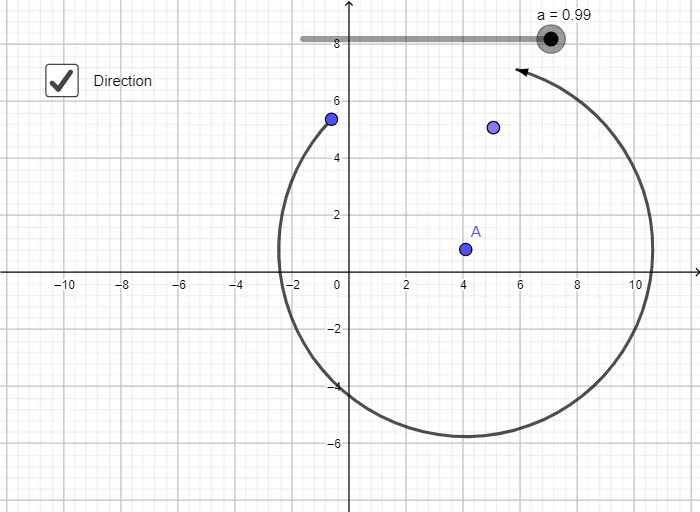
This example demonstrates how to create an animated arched vector using a directed arc, where vectors move along a curved path with clear directional indicators. Core mathematical concepts include circular arcs, vector rotation, angle parameterization, and conditional display via the If command. Construction highlights: using GeoGebra's CircleArc command to build the arc, combined with If, Distance, and Rotate commands; objects include A, C, B, c, α, β, a, b, d, e, t1, and t1', where t1 serves as a slider parameter to drive the animation, Rotate changes vector orientation, and Distance computes lengths. Suitable for high school or college students learning vectors, trigonometry, parametric equations, and dynamic geometry, as well as for visualizing force composition or motion direction in physics.
GeoGebra Commands & Parameters
CircleArc(A, B, C) → cIf(arg(B - A) < 0, arg(B - A) + (2 * π), arg(B - A)) → αIf(arg(C - A) < 0, arg(C - A) + (2 * π), arg(C - A)) → βIf(b, CircleArc[A, Point[c, 0], Point[c, fractionalPart(a)]], CircleArc[A, Point[c, 1 - fractionalPart(a)], Point[c, 1]]) → dDistance(B, A) → eIf(b, Polygon[A + (e, 0), A + (e + 0.15, -0.4), A + (e - 0.15, -0.4)], Polygon[A + (e, 0), A + (e + 0.15, 0.4), A + (e - 0.15, 0.4)]) → t1Rotate(t1, If[b, α + (fractionalPart(a) * (β + If[α > β, (2 * π), 0] - α)), β + If[α > β, (2 * π), 0] - (fractionalPart(a) * (β + If[α > β, (2 * π), 0] - α))], A) → t1'
AI Drawing Prompt Reference
Draw an arc with arrows that move along the curve. Start by creating three points A, B, and C, and use them to create an arc c. Then, calculate the angles α and β for vectors AB and AC. Depending on the value of parameter a, determine the position of arc d. Calculate the length e of vector AB and draw arrow t1 based on the value of b. Finally, rotate arrow t1 around point A to move it along the arc c, creating an animated effect.
The prompt above was compiled from the original drawing commands and is for reference only.