
Diplomatic Relations
Loading the math board and drawing, please wait…
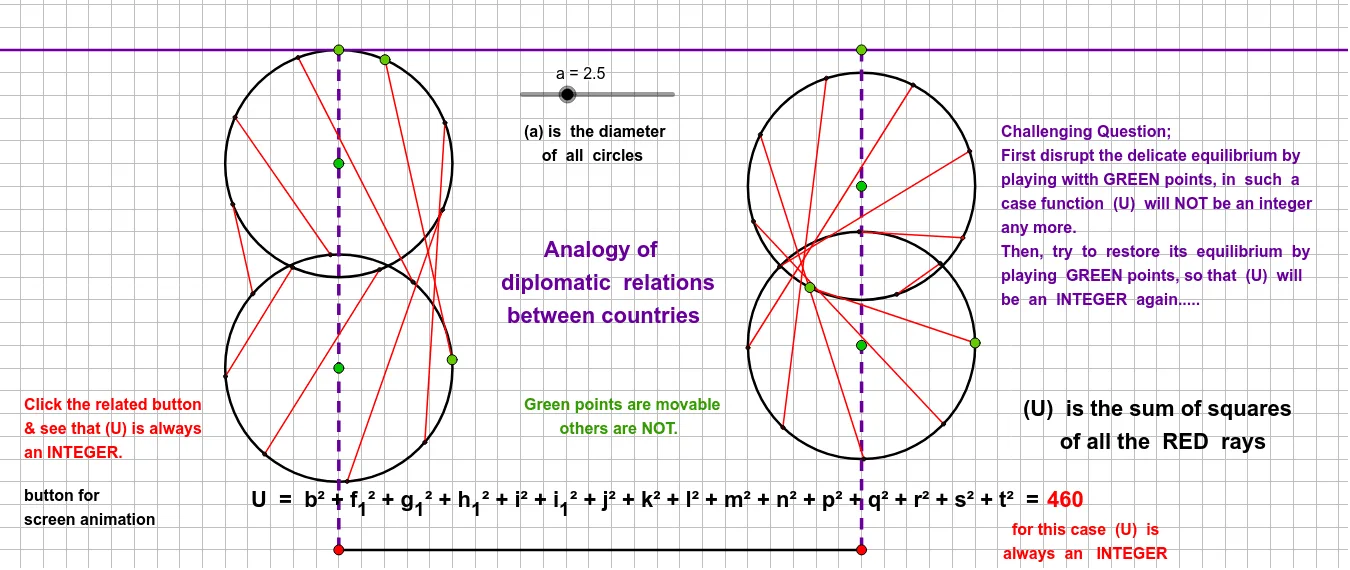
This example demonstrates geometric relationships between polygons and circles, involving core concepts like circles, polygons, symmetry, and geometric transformations. It is constructed using commands such as Segment, Point, Circle, Rotate, Angle, and Line in GeoGebra, making it suitable for high school mathematics students and geometry enthusiasts.
GeoGebra Commands & Parameters
Segment(G, H) → h_2Segment(E, F) → gPoint(g) → APoint(g) → BPoint(h_2) → CPoint(h_2) → DCircle(A, a) → cCircle(B, a) → dCircle(C, a) → eCircle(D, a) → fPoint(c) → IRotate(I, 45°, A) → I'Angle(I, A, I') → αRotate(I', 45°, A) → I''Angle(I', A, I'') → βRotate(I'', 45°, A) → I'''Angle(I'', A, I''') → γRotate(I''', 45°, A) → JAngle(I''', A, J) → δRotate(J, 45°, A) → J'Angle(J, A, J') → εRotate(J', 45°, A) → J''Angle(J', A, J'') → ζRotate(J'', 45°, A) → J'''Angle(J'', A, J''') → ηPoint(d) → KRotate(K, 45°, B) → K'Angle(K, B, K') → θRotate(K', 45°, B) → K''Angle(K', B, K'') → ιRotate(K'', 45°, B) → K'''Angle(K'', B, K''') → κRotate(K''', 45°, B) → LAngle(K''', B, L) → λRotate(L, 45°, B) → L'Angle(L, B, L') → μRotate(L', 45°, B) → L''Angle(L', B, L'') → νRotate(L'', 45°, B) → L'''Angle(L'', B, L''') → ξPoint(e) → MPoint(f) → NRotate(M, 45°, C) → M'Angle(M, C, M') → οRotate(M', 45°, C) → M''Angle(M', C, M'') → ρRotate(M'', 45°, C) → M'''Angle(M'', C, M''') → σRotate(M''', 45°, C) → OAngle(M''', C, O) → τRotate(O, 45°, C) → O'Angle(O, C, O') → υRotate(O', 45°, C) → O''Angle(O', C, O'') → ϕRotate(O'', 45°, C) → O'''Angle(O'', C, O''') → χRotate(N, 45°, D) → N'Angle(N, D, N') → ψRotate(N', 45°, D) → N''Angle(N', D, N'') → ωRotate(N'', 45°, D) → N'''Angle(N'', D, N''') → α_1Rotate(N''', 45°, D) → PAngle(N''', D, P) → β_1Rotate(P, 45°, D) → P'Angle(P, D, P') → γ_1Rotate(P', 45°, D) → P''Angle(P', D, P'') → δ_1Rotate(P'', 45°, D) → P'''Angle(P'', D, P''') → ε_1Segment(I, K) → iSegment(J''', L''') → jSegment(J'', L'') → kSegment(J', L') → lSegment(J, L) → mSegment(I''', K''') → nSegment(I'', K'') → pSegment(I', K') → qSegment(M, N) → rSegment(M', N') → sSegment(M'', N'') → tSegment(M''', N''') → bSegment(O, P) → f_1Segment(O', P') → g_1Segment(O''', P''') → h_1Segment(O'', P'') → i_1Line(R, S) → hSegment(F, Q) → j_1
AI Drawing Prompt Reference
Draw two line segments, one horizontal and one slanted, with two points on each. Use these four points as centers to draw four circles of equal radius. Pick a point on the first circle and rotate it around its center in 45-degree steps eight times, marking the angles between consecutive points and the center. Repeat the same for a point on the second circle. For the third and fourth circles, pick one point on each and rotate it three times in 45-degree steps. The final figure shows symmetric rotational relationships among circles and polygon vertices, with all angles being 45 degrees.
The prompt above was compiled from the original drawing commands and is for reference only.