
Dilations
Loading the math board and drawing, please wait…
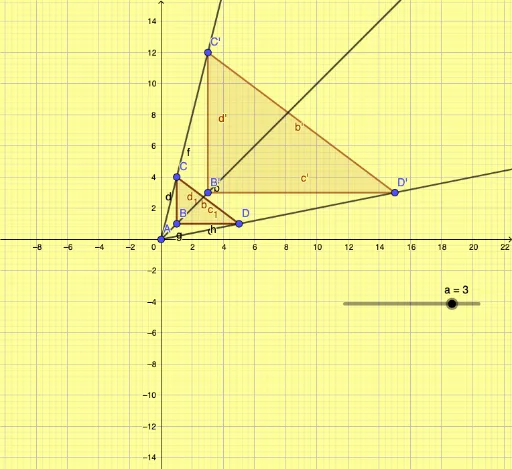
This example demonstrates the concept of dilations. By transforming the original quadrilateral, it shows how dilations preserve angles while changing the lengths of the sides. The Dilate command is used for the transformation, and Ray and Polygon commands are utilized to construct the geometric figures. Suitable for high school geometry, it aids students in understanding the properties of dilations.
GeoGebra Commands & Parameters
Segment(C, B) → dSegment(B, D) → cSegment(D, C) → bPolygon(B, C, D) → t1, d_1, b_1, c_1Dilate(B, a, A) → B'Dilate(C, a, A) → C'Dilate(D, a, A) → D'Polygon(B', C', D') → t1', d', b', c'Ray(A, C') → fRay(A, B) → gRay(A, D) → h
AI Drawing Prompt Reference
Draw a quadrilateral and then dilate it from one vertex to create a new quadrilateral with scaled sides. Connect the center point to two adjacent vertices of the new quadrilateral with rays. Show how the angles are preserved while the lengths change during the dilation process.
The prompt above was compiled from the original drawing commands and is for reference only.