
Dilations - Size: Scaling a Triangle by a Factor
Loading the math board and drawing, please wait…
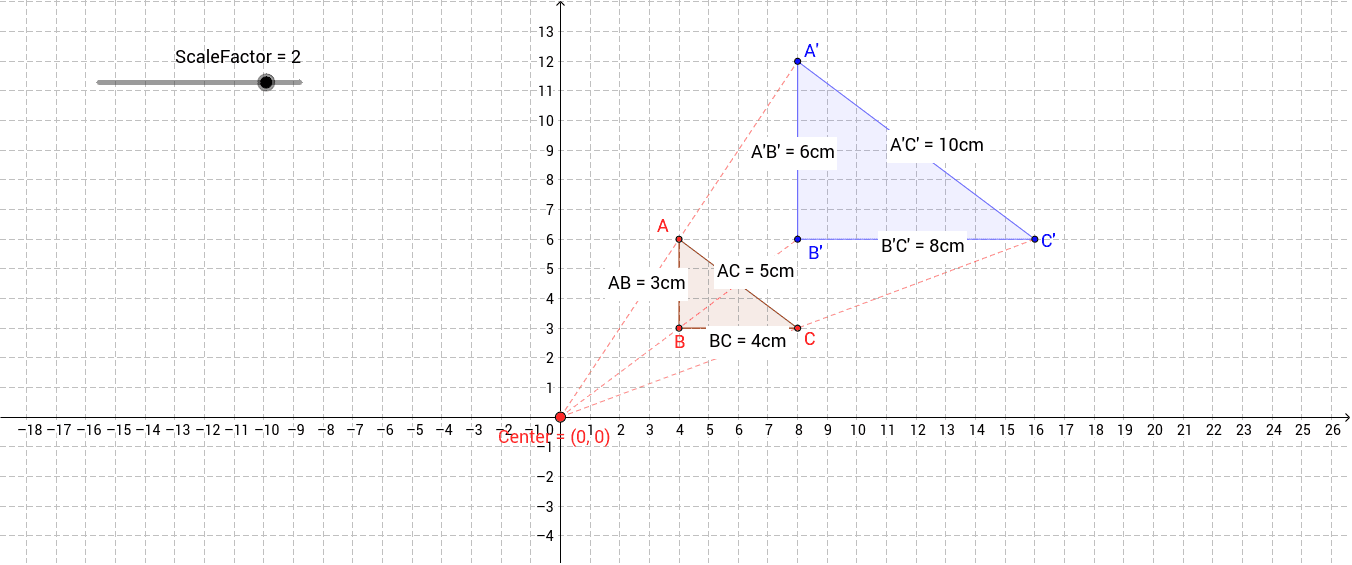
① This GeoGebra example demonstrates the dilation (scaling) of a triangle about a fixed center, showing how the image triangle enlarges or shrinks according to a scale factor. ② The core mathematical concept is homothety (central similarity), involving the scale factor, center of dilation, proportional side lengths, and similarity of triangles. ③ Construction details: The original triangle ABC is created using the Polygon command; the image triangle A'B'C' is generated via the Dilate command with a specified center and scale factor; Segment and Distance commands measure corresponding side lengths (e.g., AB vs A'B'), and text objects display these distances for direct comparison. ④ Suitable for middle school geometry or introductory high school coordinate geometry, useful for exploring similarity transformations, proportional reasoning, and dynamic slider-controlled parameter changes.
GeoGebra Commands & Parameters
Polygon(A, B, C) → Original, c, a_1, bDilate(A, ScaleFactor, Center) → A'Dilate(B, ScaleFactor, Center) → B'Dilate(C, ScaleFactor, Center) → C'Polygon(A', B', C') → Image, c', a', b'Segment(Center, A') → fSegment(Center, B') → gSegment(Center, C') → hDistance(A, B) → distanceABDistance(B, C) → distanceBCDistance(A, C) → distanceACDistance(A', C') → distanceA'C'Distance(A', B') → distanceA'B'Distance(B', C') → distanceB'C'