
Coordinate Dilation Demo: Polygon Scaling About a Center
Loading the math board and drawing, please wait…
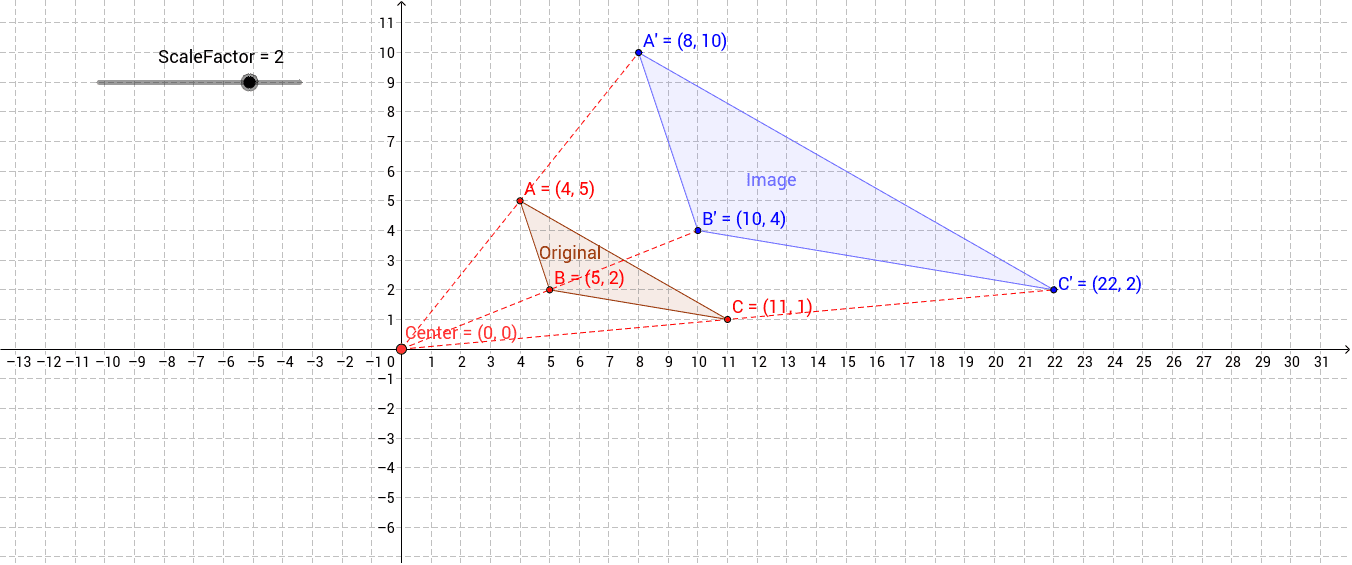
① This example demonstrates a dilation (scaling) of a polygon about a fixed center in the Cartesian plane, showing how the figure changes position, size, and orientation for different scale factors.
② Core mathematical concepts: dilation transformation, similarity transformation, scale factor and center in coordinate geometry, preservation of similarity.
③ Construction highlights: Polygon creates the original figure; Dilate with ScaleFactor and Center performs the scaling; Segment connects corresponding vertices; key objects include A, B, C, Original, Image, A', B', C', etc.
④ Suitable for middle‑school geometry lessons on similarity, high‑school analytic geometry review, and as a starter template for GeoGebra animation projects.
GeoGebra Commands & Parameters
Polygon(A, B, C) → Original, c, a_1, bDilate(A, ScaleFactor, Center) → A'Dilate(B, ScaleFactor, Center) → B'Dilate(C, ScaleFactor, Center) → C'Polygon(A', B', C') → Image, c', a', b'Segment(Center, A') → fSegment(Center, B') → gSegment(Center, C') → h
AI Drawing Prompt Reference
Draw a triangle in the Cartesian plane with a fixed point as the scaling center. Apply a given scale factor to each vertex of the triangle about this center to obtain three new corresponding points. Connect each original vertex to its scaled counterpart with a segment to show the transformation. Then construct a new triangle from the three scaled points, which remains similar to the original. The figure should include the original triangle, the scaled triangle, the center point, and the connecting segments, illustrating the dilation of a polygon about a center.
The prompt above was compiled from the original drawing commands and is for reference only.