
Dilations of Quadrilaterals
Loading the math board and drawing, please wait…
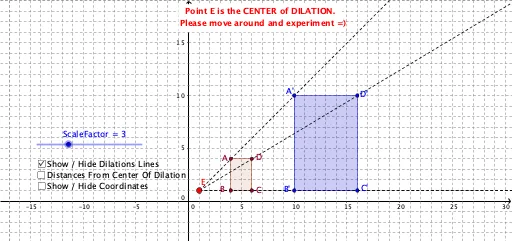
This example demonstrates the effect of dilation on any quadrilateral by moving the center of dilation and adjusting the scale factor. It involves core concepts like similarity transformation, scale factor, and geometric transformations. Constructed using commands like Segment, Polygon, Circle, and Intersect, with sliders for dynamic manipulation. Ideal for high school students learning about geometric transformations and similar figures.
GeoGebra Commands & Parameters
Segment(A, E) → jPolygon(A, B, C, D) → poly1, a, b, c, dRay(E, A) → eRay(E, B) → fRay(E, D) → gRay(E, C) → hCircle(E, A) → k_1Circle(E, (ScaleFactor * j)) → pIntersect(p, e) → A',Segment(E, B) → lCircle(E, (ScaleFactor * l)) → qIntersect(q, f) → B',Segment(E, D) → mCircle(E, (ScaleFactor * m)) → rIntersect(r, g) → D',Segment(E, C) → nCircle(E, (ScaleFactor * n)) → sIntersect(s, h) → C',Polygon(A', B', C', D') → poly2, a', b', c', d'
AI Drawing Prompt Reference
Draw an arbitrary quadrilateral and a point outside it as the dilation center. Construct rays from the center to each vertex of the quadrilateral. For each vertex, draw a circle centered at the dilation center with radius equal to the distance from the center to that vertex multiplied by a scale factor. The intersection of each circle with its corresponding ray gives the dilated vertex. Connect these new vertices in order to form the dilated quadrilateral. Include a slider to adjust the scale factor dynamically, showing the similarity transformation between the original and dilated shapes.
The prompt above was compiled from the original drawing commands and is for reference only.