
Dilations (Negative and Positive Scale Factors)
Loading the math board and drawing, please wait…
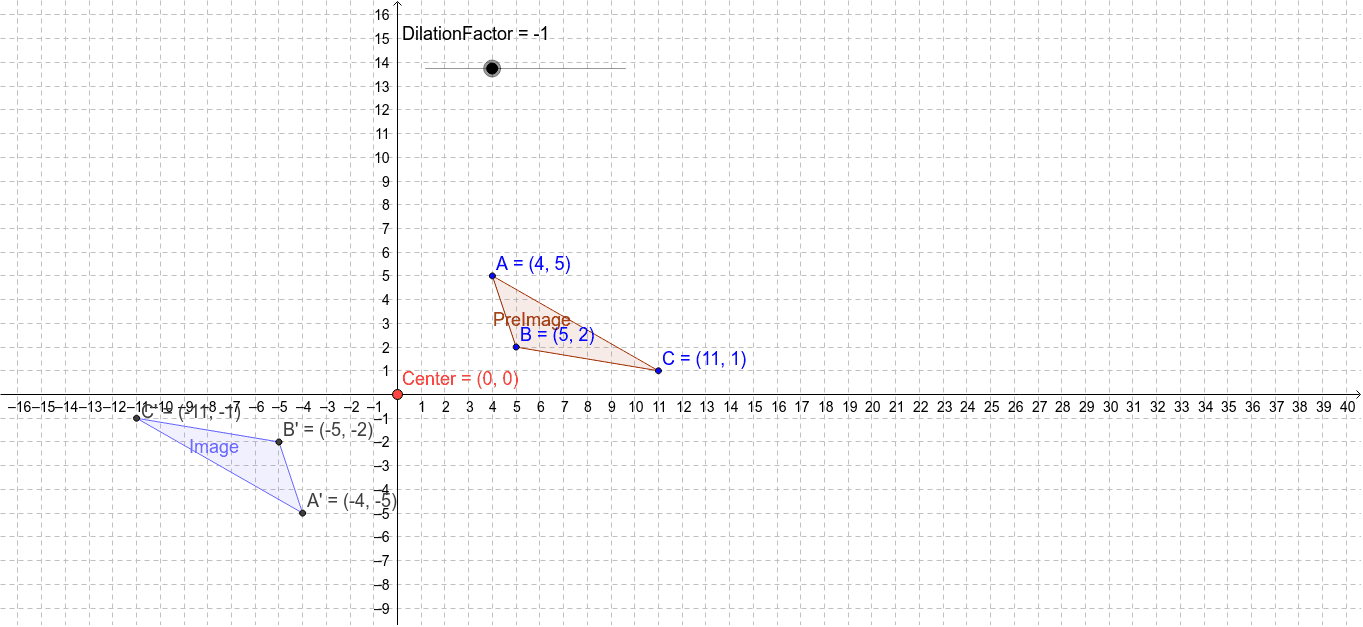
This example demonstrates how to perform dilations using GeoGebra, particularly with negative and positive scale factors. Key math concepts include dilation, kite, orthocenter, parallelogram, and equilateral triangles. Construction highlights the use of GeoGebra commands Polygon and Dilate, along with objects like DilationFactor, Center, vertices A, B, C, PreImage, and others. Suitable for high school mathematics education to understand and apply properties of dilation transformations.
GeoGebra Commands & Parameters
Polygon(A, B, C) → PreImage, c, a_1, bDilate(A, DilationFactor, Center) → A'Dilate(B, DilationFactor, Center) → B'Dilate(C, DilationFactor, Center) → C'Polygon(A', B', C') → Image, c', a', b'
AI Drawing Prompt Reference
Draw a geometric construction demonstrating dilation with positive and negative scale factors, showing the center of dilation, original vertices forming a polygon, and the dilated vertices forming a new polygon. Key elements include the center, original vertices, original polygon, and dilated polygon. Start by drawing the original polygon, then dilate each vertex successively, and finally form the new polygon with the dilated vertices to illustrate the properties of dilation transformations.
The prompt above was compiled from the original drawing commands and is for reference only.