
Dilation Transformation Demo by Steve Lege
Loading the math board and drawing, please wait…
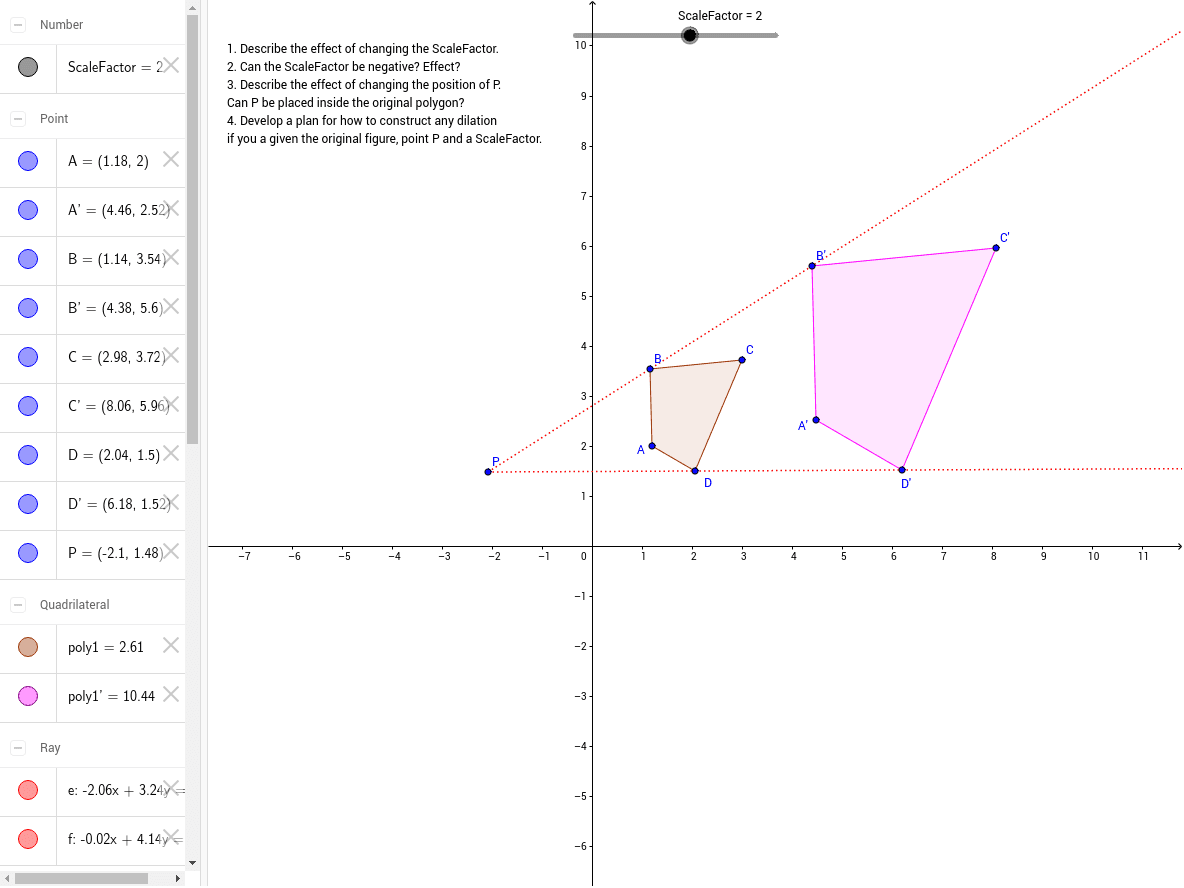
This example demonstrates the similarity transformation of a polygon under a given scale factor and center of dilation. It involves core math concepts like dilation, scale factor, and geometric construction. The construction uses commands like Polygon, Dilate, Ray and objects such as A, B, C, D, poly1, P, ScaleFactor. Suitable for high school students learning geometric transformations.
GeoGebra Commands & Parameters
Polygon(A, B, C, D) → poly1, a, b, c, dDilate(A, ScaleFactor, P) → A'Dilate(B, ScaleFactor, P) → B'Dilate(C, ScaleFactor, P) → C'Dilate(D, ScaleFactor, P) → D'Polygon(A', B', C', D') → poly1', a', b', c', d'Ray(P, B) → eRay(P, D) → f
AI Drawing Prompt Reference
Draw an arbitrary quadrilateral. Choose a fixed point as the center of dilation and set a scale factor. From this center, draw rays to each of the four vertices. Then, scale each vertex along its corresponding ray by the given factor to obtain four new points. Connect these new points in order to form the dilated quadrilateral. Keep the original quadrilateral and all rays visible, clearly showing the correspondence between the two shapes and the center.
The prompt above was compiled from the original drawing commands and is for reference only.