
Dilation Problem: Constructing and Exploring Scaled Polygons
Loading the math board and drawing, please wait…
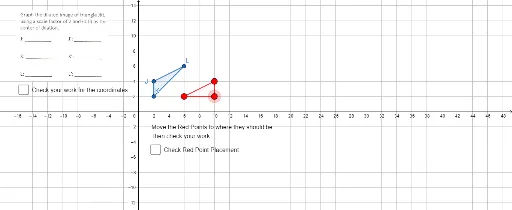
① This GeoGebra example demonstrates how to construct the image of a polygon (e.g., a triangle) under a dilation transformation, and explore the positional and size relationships between the original figure and its image. ② The core mathematical concept is homothety (dilation) in plane geometry, involving scale factor, collinearity of corresponding points with the center, and properties of similar figures. ③ Construction highlights: from the summary, the Polygon command creates polygons (e.g., J, K, L), the Dilate command scales points or polygons (producing A', J', K', L', etc.), and the Intersect command finds intersection points (D, E, F). Additional objects include circles, functions, tree diagrams, Poisson distribution, and 3D vectors, but the main focus is dilation; text objects (text1–text7) label information. ④ Suitable for upper middle school or high school students to understand geometric transformations, similarity, and centers of homothety, and useful for classroom demonstrations or student exploration.
GeoGebra Commands & Parameters
Polygon(K, J, L) → t1, c, b, aIntersect(xAxis, yAxis) → DPolygon(A', H, I) → t2, i, a', hDilate(K, 2, D) → K'Dilate(J, 2, D) → J'Dilate(L, 2, D) → L'Polygon(K', J', L') → t1', l', k', j'