
Dilation Interactive (Quadrilateral)
Loading the math board and drawing, please wait…
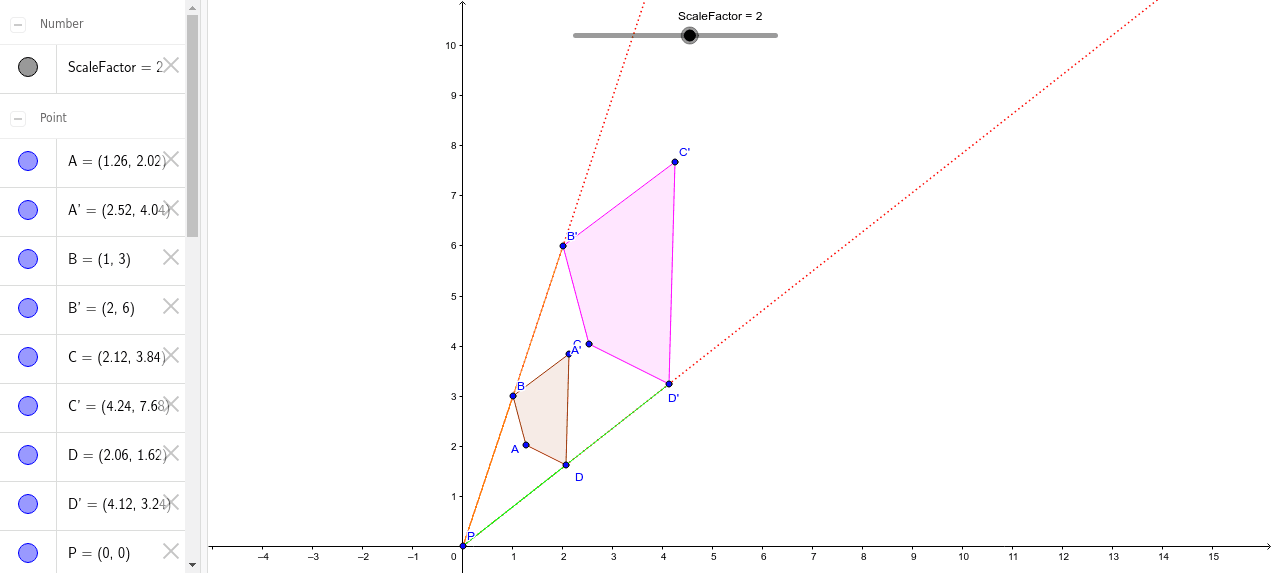
This example demonstrates the properties of a quadrilateral under dilation, showing how the shape changes and the relationships between corresponding points. Key math concepts include dilation, scale factor, corresponding points, and segment ratios. Constructed using Polygon, Dilate, Ray, and Segment commands to create quadrilateral ABCD and its dilated image A'B'C'D', highlighting the proportional relationships between corresponding sides AB/A'B', BC/B'C', CD/C'D', and DA/D'A'. Suitable for high school students to explore the properties of dilation and its applications.
GeoGebra Commands & Parameters
Polygon(A, B, C, D) → ABCD, AB, BC, CD, DADilate(A, ScaleFactor, P) → A'Dilate(B, ScaleFactor, P) → B'Dilate(C, ScaleFactor, P) → C'Dilate(D, ScaleFactor, P) → D'Polygon(A', B', C', D') → A'B'C'D', A'B', B'C', C'D', D'A'Ray(P, B) → eRay(P, D) → fSegment(P, B) → PBSegment(P, B') → PB'Segment(P, D) → PDSegment(P, D') → PD'