
Dilation Demo: Similarity of Triangles and Polygons
Loading the math board and drawing, please wait…
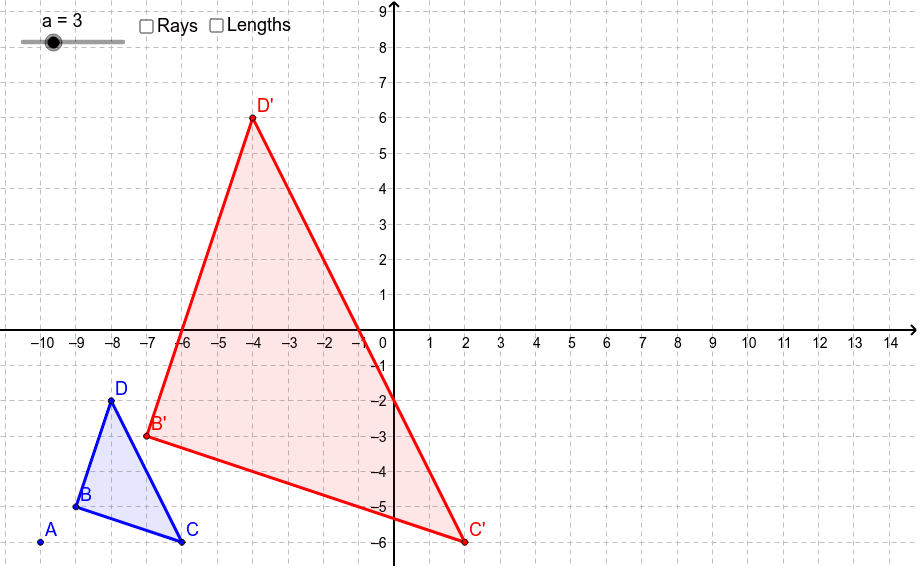
① This example demonstrates how a dilation (scaling) transformation produces similar triangles and polygons, showing the proportional relationships of corresponding side lengths. ② Key mathematical concepts: geometric dilation, similarity, scale factor, ratios of side lengths and areas. ③ Construction highlights: Polygon creates the original figure poly1; Dilate applies a scale factor to vertices A, B, C, D and the whole polygon to obtain poly1'; Ray draws rays from the center of dilation for visual guidance; Distance measures original and dilated segment lengths (distanceAD, distanceAB, distanceAC and their primed counterparts) with Text labels for dynamic display. ④ Suitable for middle‑school geometry lessons on similarity transformations, high‑school analytic geometry review, and beginners learning GeoGebra transformation commands and dynamic measurement.
GeoGebra Commands & Parameters
Polygon(B, C, D) → poly1, d, b, cDilate(B, a, A) → B'Dilate(C, a, A) → C'Dilate(D, a, A) → D'Polygon(B', C', D') → poly1', d', b', c'Ray(A, D) → eRay(A, B) → fRay(A, C) → gDistance(A, D) → distanceADDistance(A, D') → distanceAD'Distance(A, B) → distanceABDistance(A, B') → distanceAB'Distance(A, C) → distanceACDistance(A, C') → distanceAC'
AI Drawing Prompt Reference
Create a similarity demonstration with a chosen center of dilation: draw a triangle, then transform its three vertices by the same scale factor to obtain corresponding new vertices, and connect them to form the dilated triangle. Draw rays from the center through each original vertex so that each original vertex, its image, and the center are collinear. Measure and display the distances from the center to each original vertex and to the corresponding image vertex, allowing comparison of their proportional relationships.
The prompt above was compiled from the original drawing commands and is for reference only.