
Different Forms of Linear Equations Graphs
Loading the math board and drawing, please wait…
In collections
Introduction to Linear Functions and Graphs
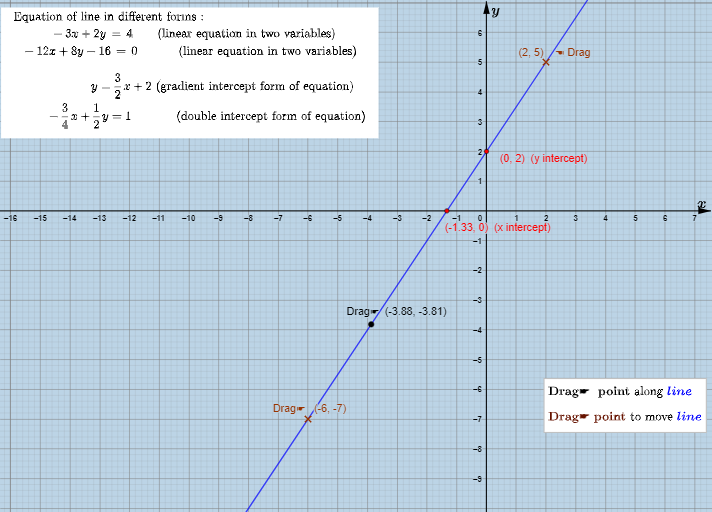
This example demonstrates different forms of linear equations, including slope-intercept form and two-point form. Using the GeoGebra commands listed in the construction summary, you can clearly see how to use these commands to draw lines. Suitable for students from middle school and above to learn about linear equations and their graphs.
GeoGebra Commands & Parameters
Line(A, B) → fCoefficients(g(x)) → l1If(Length[l1] > 1, Element[l1, 1], 0) → mIf(Length[l1] > 1, Element[l1, 2], Element[l1, 1]) → cIntersect(f, xAxis) → CIntersect(f, yAxis) → DPoint(f) → EPoint(f) → F
AI Drawing Prompt Reference
In the same coordinate plane, draw line graphs to demonstrate different linear equation forms. First plot a line determined by a chosen linear relationship, then show where this line intersects the x-axis and the y-axis, marking the two intersection points. Next, place the additional key points that correspond to representative points on the line implied by the function relationship. Use these marked points as references to visually compare how the line’s slope and intercept differences reflect the different linear forms.
The prompt above was compiled from the original drawing commands and is for reference only.