
Diagonals of a Rhombus: Interactive Exploration
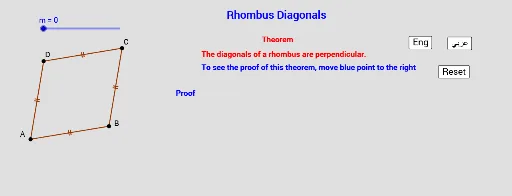
Loading the math board and drawing, please wait…
In collections
Quadrilaterals الرُباعيات
This GeoGebra example dynamically demonstrates the key properties of a rhombus's diagonals: they are perpendicular and bisect each other. It uses vectors, translations, polygons, segments, intersections, and angle measurements to build an interactive figure. Core math concepts include rhombus definition, diagonal properties, perpendicularity, bisection, and angle measurement. Construction highlights: Vector and Translate create the parallelogram structure, Polygon forms the rhombus, Segment draws diagonals, Intersect finds the midpoint, and Angle measures the right angle. Buttons and text objects allow toggling between English and Arabic, with answer-checking features. Suitable for middle school geometry lessons or self-study, enabling students to visually verify and explore the diagonal properties of a rhombus.
GeoGebra Commands & Parameters
Vector((-6, -1)) → uTranslate(C1, Vector[(e * u)]) → CTranslate(B1, Vector[(e * u)]) → BPolygon(A, B, C, D) → poly1, h, i, j, kSegment(C, A) → fSegment(B, D) → gIntersect(f, g) → EAngle(C, E, D) → αIntersect(g, f) → OSegment(O, A) → lSegment(O, B) → nSegment(O, C) → pSegment(O, D) → qSegment(O, C) → r