
Determining Cubic Function Equations from Graphs
Loading the math board and drawing, please wait…
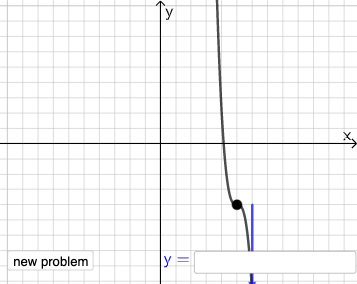
This example demonstrates how to derive the equation of a cubic function from its graph. Students learn to identify key points on the graph, set up systems of equations using the undetermined coefficient method, and solve for the function's coefficients. The core mathematical concepts include cubic function graphs, function equations, solving systems of equations, and coordinate analysis. Construction highlights: using Point commands to mark critical points, Line for auxiliary lines, Textfield for student input, If for answer verification, and RandomElement/Random to generate varied practice problems. Suitable for secondary school mathematics courses on functions, graphs, and equation solving.
GeoGebra Commands & Parameters
Point(Segment[(h + 1, y(C) + 10), (h + 1, y(C) - 10)]) → DLine(A, B) → fVector(A, C) → uPolygon(A, C, B) → t1, b, a_1, cSegment(A, C) → h_{1}Vector(C, D) → vVector((h, 0), A) → wVector((0, 0), (h, 0)) → jRandomElement({-8, -7, -6, -5, -4, -3, -2, -1, 1, 2, 3, 4, 5, 6, 7, 8}) → nRandom(-8, 8) → oRandom(-8, 8) → pIf(h ≟ o, "Horizontal shift is correct!", "Horizontal shift is not correct.") → text9If(n ≟ rise, "Vertical stretch is correct!", "Vertical stretch is not correct.") → text10If(p ≟ y(A), "Vertical shift is correct!", "Vertical shift is not correct.") → text11Textfield(s) → InputBox1Vector(G, G + (0, n)) → r
AI Drawing Prompt Reference
Draw a cubic function graph and demonstrate how to derive its equation from the graph. Mark key points on the graph, draw auxiliary lines and a polygon. Then, show vectors for horizontal and vertical stretches, and random shifts. Use a text box for student input and conditional statements to verify answers.
The prompt above was compiled from the original drawing commands and is for reference only.