
Detailed Sphere Section by S Sharma
Loading the math board and drawing, please wait…
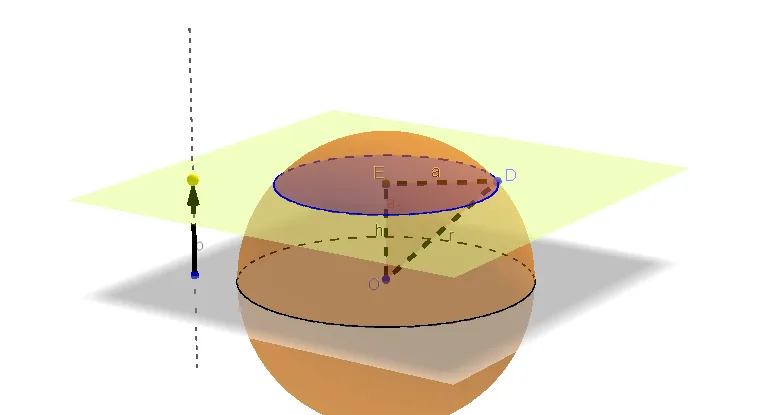
This example demonstrates the formation and properties of a sphere's cross-section. It involves core mathematical concepts such as sphere, coordinate geometry, quadratic equations, vectors, and planes. Construction highlights include commands/objects like Circle, Sphere, OrthogonalLine, Point, Vector, Plane, IntersectPath, Intersect, Segment, and Polygon from GeoGebra. Suitable for high school and above, ideal for teaching solid geometry and analytical geometry.
GeoGebra Commands & Parameters
Circle(O, 3, zAxis) → cSphere(O, 3) → a_2OrthogonalLine(B, xOyPlane) → bPoint(b) → CVector(B, C) → uPlane(C, xOyPlane) → dIntersectPath(d, a_2) → ePoint(e) → DIntersect(zAxis, d) → ESegment(D, E) → aSegment(D, O) → rSegment(O, E) → hPolygon(O, E, D) → poly1, h_2, a_1, e_1
AI Drawing Prompt Reference
Draw a sphere with a radius of 3, then draw a line perpendicular to the xOy plane passing through the center of the sphere, which intersects the sphere to form a circle. Then, draw a line through this circle's plane and the xOy plane, which intersects the sphere at point D. This line intersects the z-axis at point E. Draw line segment DE, line segment DO from D to the sphere's center, and line segment EO from E to the sphere's center. Finally, use points O, E, and D to draw a triangle.
The prompt above was compiled from the original drawing commands and is for reference only.