
Describing Translations
Loading the math board and drawing, please wait…
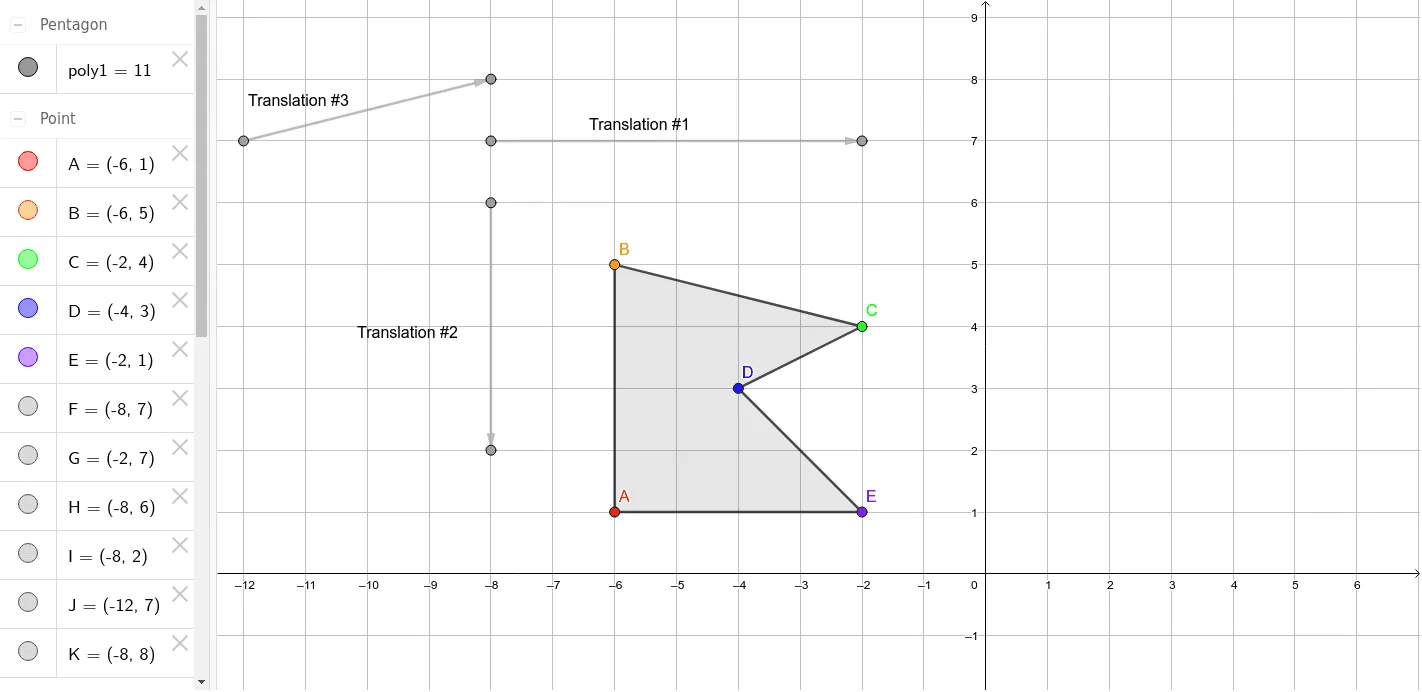
This example demonstrates how to describe and visualize translation transformations using GeoGebra, involving core concepts like vectors, polygons, coordinate geometry, and transformation properties. It utilizes commands such as Vector and Polygon, along with text and point objects, making it suitable for high school students learning geometric transformations and their applications.
GeoGebra Commands & Parameters
Vector(F, G) → uVector(H, I) → vVector(J, K) → wPolygon(A, B, C, D, E) → poly1, a, b, c, d, e
AI Drawing Prompt Reference
Draw a pentagon with vertices connected in order to form a closed shape. From one vertex of the pentagon, draw three distinct vectors, each pointing to another point, representing three translation directions. Each vector is shown as an arrowed line segment, with the arrow indicating the direction of translation. Label each vector with its name in the diagram, and show the correspondence between the original shape and its translated positions. The layout should clearly emphasize the relationship between the vectors and the polygon, suitable for illustrating the geometric meaning of translation transformations.
The prompt above was compiled from the original drawing commands and is for reference only.