
Describing the Rotation of Triangles
Loading the math board and drawing, please wait…
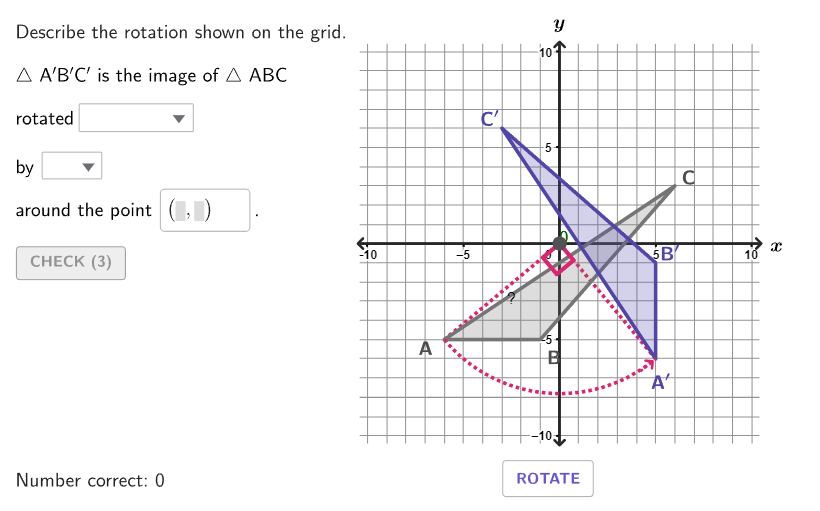
This example demonstrates how to describe the rotation of triangles on the coordinate plane. By analyzing the direction, angle, and center of rotation, students can understand the concept of rigid transformations. GeoGebra commands such as Rotate, Angle, and Textfield are used in construction. Suitable for 6-8 grade students learning geometric transformations.
GeoGebra Commands & Parameters
Shuffle(Sequence[100]) → randomList1, {47, 50, 61, 12, 35, 67, 94, 74, 76, 45, 98, 65, 25, 86, 19, 55, 85, 84, 93, 8, 26, 73, 52, 57, 75, 18, 69, 63, 37, 96, 88, 48, 1, 54, 62, 42, 17, 90, 6, 59, 39, 99, 77, 36, 16, 13, 23, 44, 71, 4, 43, 21, 70, 92, 32, 31, 80, 14, 79, 72, 38, 29, 100, 9, 5, 2, 28, 49, 78, 60, 24, 20, 95, 87, 15, 33, 68, 56, 91, 58, 53, 46, 22, 89, 30, 51, 3, 10, 64, 11, 97, 41, 34, 81, 82, 27, 40, 83, 7, 66}Shuffle(Sequence[100]) → randomList2, {12, 30, 39, 71, 65, 22, 63, 92, 44, 97, 76, 81, 55, 96, 58, 24, 26, 70, 91, 36, 15, 41, 48, 99, 68, 73, 50, 84, 18, 86, 13, 7, 11, 90, 85, 31, 93, 10, 37, 57, 33, 62, 88, 95, 17, 20, 78, 60, 3, 9, 43, 35, 79, 75, 2, 51, 87, 77, 59, 19, 34, 29, 16, 69, 32, 4, 46, 49, 5, 47, 25, 100, 94, 8, 40, 6, 28, 1, 82, 27, 23, 54, 66, 56, 42, 64, 21, 38, 83, 74, 98, 61, 67, 72, 80, 14, 45, 89, 52, 53}Zip((("$\text{" * A) * " }$"), A, {"\phantom{clockwise}", "clockwise", "counterclockwise"}) → selectDirectionZip((("$\text{" * A) * "}$"), A, {"\phantom{180}", "90^\circ ", "180^\circ", "270^\circ"}) → selectAngleElement(randomList2, Mod[countQuestion, Length[randomList2]] + 1) → randomNum2Element(randomList1, Mod[countQuestion, Length[randomList1]] + 1) → randomNum1Element({verticesCase1(indexCase1), verticesCase2(indexCase2), verticesCase3(indexCase3)}, caseNum) → currentVerticesFlatten(Sequence[Sequence[(i, j), i, -10, 10], j, -10, 10]) → gridPointsClosestPoint(gridPoints, TriangleCenter[currentVertices(1), currentVertices(2), currentVertices(3), 1]) → CenterCase2Element({(0, 0), CenterCase2, centersCase3(indexCase3)}, caseNum) → RotationPointZip(Distance[RotationPoint, A], A, currentVertices) → distanceToCenterIndexOf(Max[distanceToCenter], distanceToCenter) → whichIndexPolygon(Zip[PixelsToPoint[Corner[1], Corner[3], Corner[5], A], A, {(pixelsLeft, pixelsTop), (pixelsLeft, y(Corner[5]) - pixelsBottom), Corner[5] - (pixelsRight, pixelsBottom), (x(Corner[5]) - pixelsRight, pixelsTop)}]) → borderBoxCorner(5) → layoutAppSizePolygon({(-10.5, -10.5), (-10.5, 10.5), (10.5, 10.5), (10.5, -10.5)}) → viewboxZip(Vector[UnitVector[Vector[CenterCase2, A]]], A, currentVertices) → vLabelsPolygon(currentVertices) → triABCRotate(triABC, (slideRotate * rotateAngle°), RotationPoint) → rotationTriangleSequence(Vertex[rotationTriangle, A], A, 1, 3) → rotatedVerticesZip(Vector[Rotate[A, rotateDegrees°, RotationPoint]], Vector[A], vLabels) → vLabelsRotatedAngle(currentVertices(whichIndex), RotationPoint, rotatedVertices(whichIndex)) → showAngleCounterClockwiseAngle(rotatedVertices(whichIndex), RotationPoint, currentVertices(whichIndex)) → showAngleClockwiseTextfield(StudentCenter) → inputCenterZip(Text[("" * A), B + C, false, true, 0, 0], A, {"A", "B", "C"}, B, currentVertices, Vector[C], vLabels) → labelsABCSegment(rotatedVertices(whichIndex) + vArrow, rotatedVertices(whichIndex) + (0.2 * vArrow)) → directionArrowCircleArc(RotationPoint, If[¬clockwiseDirection, currentVertices(whichIndex), rotatedVertices(whichIndex) + (0.5 * vArrow)], If[¬clockwiseDirection, rotatedVertices(whichIndex), currentVertices(whichIndex) + (0.5 * vArrow)]) → displayRotationZip(Text[("" * If[B ≠ D, A, ""]), B + C, false, true, 0, 0], A, {"A^{\prime}", "B^{\prime}", "C^{\prime}"}, B, rotatedVertices, Vector[C], vLabelsRotated, D, currentVertices) → labelsABCPrimeSegment((-10.5, 0), (10.5, 0)) → axisSegmentXSegment((0, -10.5), (0, 10.5)) → axisSegmentYText("x", (11.3, 0), true, true, 0, 0) → lblXText("y", (0, 11.5), true, true, 0, 0) → lblYIf(correctDirection, check, cross) → feedbackDirectionIf(correctAngle, check, cross) → feedbackAngleIf(correctCenter, check, cross) → feedbackPoint
AI Drawing Prompt Reference
Draw a figure with two triangles. The left triangle is rotated to form the right triangle. The rotation center is located in the left-center of the figure. Arrows and labels connect the two triangles, indicating the rotation direction and angle. The figure also includes coordinate axes and grid lines to help locate the rotation center and angle. The overall layout is clear for demonstrating triangle rotation.
The prompt above was compiled from the original drawing commands and is for reference only.