
Describing Reflections of Figures
Loading the math board and drawing, please wait…
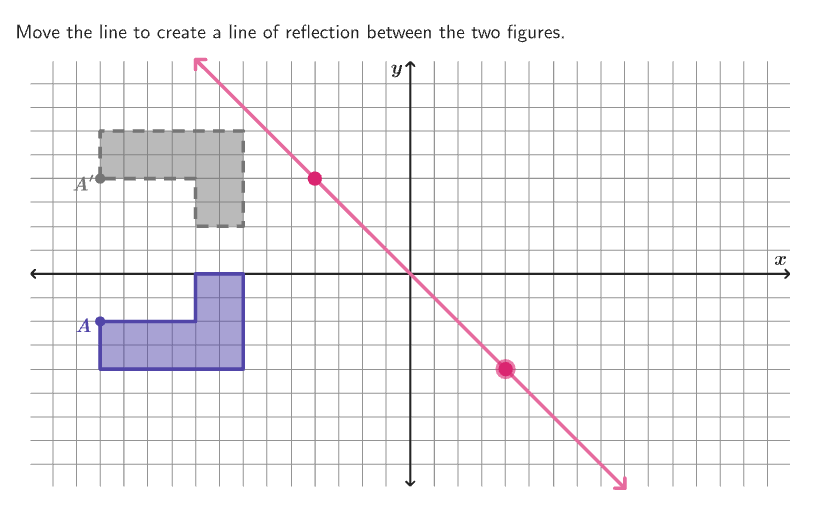
This example demonstrates how to illustrate reflections of figures on the coordinate plane. The core math concepts involved are reflections of figures across a line. Constructed using GeoGebra commands/objects like Shuffle, Element, If, Mod, Vector, Translate, LineBisector, Rotate, Mirror, Polygon, Corner, Segment, Zip, Point, Line, IntersectPath, Intersect, Text, circlePixels. Suitable for grades 6-8 to learn how to describe reflections of figures.
GeoGebra Commands & Parameters
Shuffle(Sequence[40]) → randomList2, {26, 2, 34, 40, 35, 12, 22, 25, 5, 4, 3, 19, 15, 37, 30, 7, 24, 14, 1, 16, 8, 17, 33, 11, 32, 9, 38, 31, 18, 10, 39, 13, 36, 27, 23, 21, 20, 6, 28, 29}Element(randomList2, Mod[countQuestion, 40] + 1) → randomNum2Shuffle(Sequence[20]) → randomList1, {15, 3, 5, 19, 1, 20, 12, 17, 11, 13, 14, 10, 8, 9, 6, 4, 18, 2, 16, 7}Shuffle(Sequence[15]) → randomList3, {5, 13, 9, 3, 12, 10, 7, 1, 2, 4, 15, 6, 11, 8, 14}Element(randomList3, Mod[countQuestion, 15] + 1) → randomNum3Element(listYCoordInitCenter, Mod[randomNum3, Length[listYCoordInitCenter]] + 1) → yInitCenterShuffle(Sequence[15]) → randomList5, {15, 9, 10, 6, 7, 11, 8, 1, 14, 3, 12, 13, 5, 4, 2}Element(randomList5, Mod[countQuestion, 15] + 1) → randomNum5If(Mod[randomNum1, 2] ≟ 1, yInitCenter, Element[listYCoordImgCenter, Mod[randomNum5, Length[listYCoordImgCenter]] + 1]) → yInitCenterImgElement(listXCoordInitCenter, Mod[randomNum2, Length[listXCoordInitCenter]] + 1) → xInitCenterShuffle(Sequence[15]) → randomList4, {7, 12, 15, 2, 10, 1, 6, 8, 11, 9, 14, 3, 4, 13, 5}Element(randomList4, Mod[countQuestion, 15] + 1) → randomNum4If(Mod[randomNum1, 2] ≟ 0, xInitCenter, Element[listXCoordImgCenter, Mod[randomNum4, Length[listXCoordImgCenter]] + 1]) → xInitCenterImgShuffle(Sequence[15]) → randomList6, {4, 7, 14, 8, 1, 12, 5, 9, 2, 3, 10, 6, 15, 11, 13}Mod(Element[randomList6, Mod[countQuestion, 15] + 1], 4) → randomNum6Vector(CenterPoint, (xInitCenter, yInitCenter)) → vectorInitialTranslate(CenterPoint, vectorInitial) → CenterPointPreLineBisector(CenterPointPre, CenterPointImg) → lineReflectionRotate(Translate[listBasicVertices(randomNum1), vectorInitial], (90° * randomNum6), CenterPointPre) → verticesPreMirror(verticesPre, lineReflection) → verticesImgShuffle(Sequence[15]) → randomList7, {5, 4, 9, 1, 12, 3, 11, 6, 10, 8, 13, 2, 14, 15, 7}Polygon(Zip[PixelsToPoint[Corner[1], Corner[3], Corner[5], A], A, {(pixelsLeft, pixelsTop), (pixelsLeft, y(Corner[5]) - pixelsBottom), Corner[5] - (pixelsRight, pixelsBottom), (x(Corner[5]) - pixelsRight, pixelsTop)}]) → borderBoxCorner(5) → layoutAppSizePolygon({(16, 9), (-16, 9), (-16, -9), (16, -9)}) → viewBoxSegment((-15.9, 0), (15.9, 0)) → axisXSegment((0, -8.9), (0, 8.9)) → axisYPolygon(verticesPre) → FigurePrePolygon(verticesImg) → FigureImgZip(FromTo[AA, BB, timer], AA, verticesPre, BB, verticesImg) → verticesStPolygon(verticesSt) → FigureStPoint(Sequence[Sequence[(a, b), a, -8, 8], b, -8, 8]) → Input1Point(Sequence[Sequence[(a, b), a, -8, 8], b, -8, 8]) → Input2Line(Input1, Input2) → lineReflectionStAuxZip(Segment[AA, BB], AA, verticesPre, BB, verticesSt) → dashedSegmentsIntersectPath(lineReflectionStAux, viewBox) → lineReflectionStIntersectPath(lineReflection, viewBox) → lineReflectionArrowsIntersect(Circle[CenterPointPre, Distance[CenterPointPre, A] + 0.7], Ray[CenterPointPre, A]) → posLblPointPre,Mirror(posLblPointPre, lineReflection) → posLblPointImgText("A^\prime", posLblPointImg, false, true, 0, 0) → lblA'Text("A", posLblPointPre, false, true, 0, 0) → lblAcirclePixels(Input2, 7 + (7 * pulsing), Corner[1], Corner[3], Corner[5]) → pulsingObject
AI Drawing Prompt Reference
Draw a figure and its reflection across a line. First, determine the vertices of the original figure, then find the reflected vertices through rotation and translation. Next, draw the original figure and its reflection. Finally, draw segments connecting original vertices to their reflections and label them.
The prompt above was compiled from the original drawing commands and is for reference only.