
Describing Horizontal and Vertical Translations of Figures
Loading the math board and drawing, please wait…
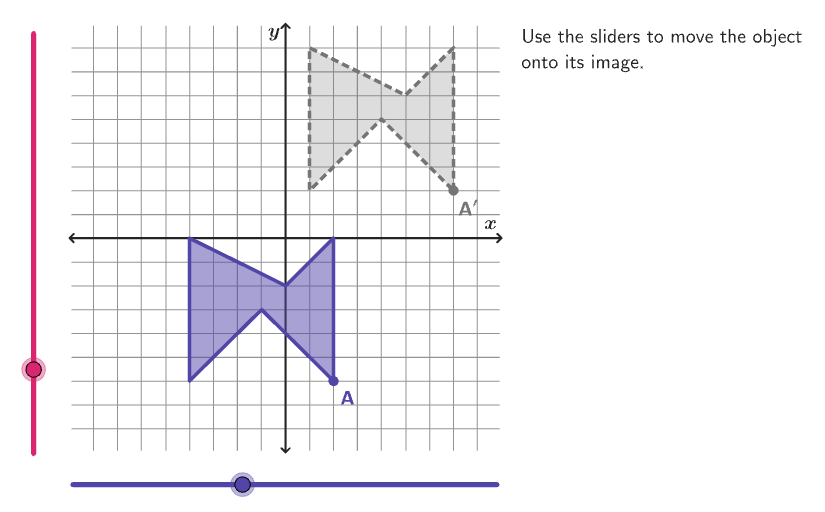
This example demonstrates how to translate figures horizontally and vertically on the coordinate plane. Key math concepts include rigid transformations, translations, and coordinate geometry. Construction highlights: Utilizes GeoGebra commands like Shuffle, Vector, Mod, Element, Translate, Rotate, Textfield, Polygon, Corner, Segment, Intersect, Text; objects include input2, listBasicVertices, randomList6, input1, vectorSt, listCenters, countQuestion, randomNum6, randomList2, randomNum2, randomList1, randomNum1, CenterPoint, radios, radiusFig, listCoordInitCenter, xInitCenter, randomList3, randomNum3, yInitCenter, vectorInitial, CenterPointPre, verticesPre, randomList4, randomNum4, yInitCenterImg, xInitCenterImg, CenterPointImg, xMax, yMin, randomList7, vectorTransl, randomList5, randomNum5, colorGreyDark, btnNew, InputBox1, correct, scriptResetApp, colorTealSuccess. Suitable for grades 6-8, focusing on describing rigid transformations of plane figures.
GeoGebra Commands & Parameters
Shuffle(Sequence[15]) → randomList6, {1, 3, 14, 9, 7, 6, 15, 8, 4, 13, 10, 12, 5, 2, 11}Vector((input1, input2)) → vectorStMod(Element[randomList6, Mod[countQuestion, 15] + 1], 4) → randomNum6Shuffle(Sequence[15]) → randomList2, {3, 2, 14, 12, 7, 15, 6, 8, 4, 10, 9, 5, 13, 1, 11}Element(randomList2, Mod[countQuestion, 15] + 1) → randomNum2Shuffle(Sequence[20]) → randomList1, {4, 8, 14, 6, 9, 13, 2, 3, 1, 20, 17, 5, 15, 16, 10, 7, 11, 18, 12, 19}Element(listCoordInitCenter, Mod[randomNum2, Length[listCoordInitCenter]] + 1) → xInitCenterShuffle(Sequence[15]) → randomList3, {15, 5, 2, 7, 12, 14, 3, 1, 4, 13, 11, 10, 8, 6, 9}Element(randomList3, Mod[countQuestion, 15] + 1) → randomNum3Element(listCoordInitCenter, Mod[randomNum3, Length[listCoordInitCenter]] + 1) → yInitCenterVector(CenterPoint, (xInitCenter, yInitCenter)) → vectorInitialTranslate(CenterPoint, vectorInitial) → CenterPointPreRotate(Translate[listBasicVertices(randomNum1), vectorInitial], (90° * randomNum6), CenterPointPre) → verticesPreShuffle(Sequence[15]) → randomList4, {7, 5, 4, 6, 3, 9, 14, 13, 2, 11, 15, 12, 8, 1, 10}Element(randomList4, Mod[countQuestion, 15] + 1) → randomNum4Element(listCoordInitCenter \ Sequence[yInitCenter - 2, yInitCenter + 2], Mod[randomNum4, Length[listCoordInitCenter \ Sequence[yInitCenter - 2, yInitCenter + 2]]] + 1) → yInitCenterImgElement(listCoordInitCenter \ Sequence[xInitCenter - 2, xInitCenter + 2], Mod[randomNum4, Length[listCoordInitCenter \ Sequence[xInitCenter - 2, xInitCenter + 2]]] + 1) → xInitCenterImgShuffle(Sequence[15]) → randomList7, {10, 4, 1, 8, 14, 6, 5, 3, 11, 2, 13, 9, 12, 15, 7}Vector(CenterPointPre, CenterPointImg) → vectorTranslShuffle(Sequence[15]) → randomList5, {4, 2, 15, 7, 12, 14, 13, 6, 10, 11, 9, 8, 5, 3, 1}Element(randomList5, Mod[countQuestion, 15] + 1) → randomNum5Textfield(input1) → InputBox1Polygon(Zip[PixelsToPoint[Corner[1], Corner[3], Corner[5], A], A, {(pixelsLeft, pixelsTop), (pixelsLeft, y(Corner[5]) - pixelsBottom), Corner[5] - (pixelsRight, pixelsBottom), (x(Corner[5]) - pixelsRight, pixelsTop)}]) → borderBoxCorner(5) → layoutAppSizePolygon({(9, 9), (-9, 9), (-9, -9), (9, -9)}) → viewBoxSegment((-9, 0), (9, 0)) → axisXSegment((0, -9), (0, 9)) → axisYPolygon(verticesPre) → FigurePreTranslate(verticesPre, vectorTransl) → verticesImgPolygon(verticesImg) → FigureImgTranslate(verticesPre, vectorSt) → verticesStPolygon(verticesSt) → FigureStIntersect(Circle[CenterPointPre, Distance[CenterPointPre, A] + 0.8], Ray[CenterPointPre, A]) → posLblPointPre,Translate(posLblPointPre, vectorTransl) → posLblPointImgText("A", posLblPointPre, false, true, 0, 0) → lblAText("A^\prime", posLblPointImg, false, true, 0, 0) → lblA'
AI Drawing Prompt Reference
Draw a planar figure on a Cartesian coordinate grid together with the coordinate axes and a defined view frame. Construct an initial polygon from a given set of vertices, then place the figure and its translated image by using a horizontal/vertical translation vector. Next, create a second configuration by using vertices derived from a rotation about a center point, and then translate those vertices again using another translation vector so that the moved figure appears in a new location. Show two corresponding marked points near the start and end positions, labeling them as A and A′ to indicate the relationship between the original and translated/rotated figures.
The prompt above was compiled from the original drawing commands and is for reference only.