
Derivation of Trapezium Area
Loading the math board and drawing, please wait…
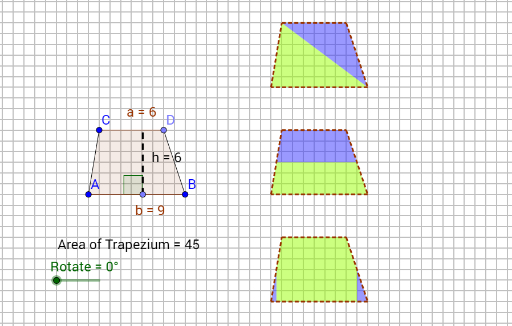
This example demonstrates the derivation of the trapezium area. Key mathematical concepts include similar triangles and isosceles triangles. Using GeoGebra commands such as Segment, Line, Point, Polygon, etc., the construction of the trapezium and related triangles is shown, illustrating the derivation of the area formula. Suitable for middle school and above students learning geometry and area calculation.
GeoGebra Commands & Parameters
Segment(A, B) → fLine(C, f) → gSegment(A, C) → h_1Point(g) → DSegment(B, D) → iPolygon(A, C, D, B) → poly1, c, a, d, bPoint(f) → EOrthogonalLine(E, a) → h_2Intersect(h_2, a) → FSegment(E, F) → hVector(I, J) → vVector(G, H) → uTranslate(A, u) → A'Translate(C, u) → C'Translate(D, u) → D'Translate(B, u) → B'Polygon(A', C', D', B') → poly1', a', c', d', b'Translate(A', v) → A''Translate(C', v) → C''Translate(D', v) → D''Translate(B', v) → B''Polygon(A'', C'', D'', B'') → poly1'', a'', c'', d'', b''Translate(A, v) → A'_1Translate(C, v) → C'_1Translate(D, v) → D'_1Translate(B, v) → B'_1Polygon(A', C', B') → poly2, b'_2, a'_2, c'_2Polygon(C', D', B') → poly3, b'_3, c'_3, d'_2Rotate(B', (-Rotate), B') → B''_1Midpoint(D', B') → KRotate(C', (-Rotate), K) → C''_1Rotate(D', (-Rotate), K) → D''_1Rotate(B', (-Rotate), K) → B''_2Polygon(C''_1, D''_1, B''_2) → poly3', b''_2, c''_1, d''_1Midpoint(A'', C'') → LMidpoint(B'', D'') → MPolygon(A'', L, M, B'') → poly4, a''_1, l, m, b''_1Polygon(L, C'', D'', M) → poly5, l_1, c''_2, d''_2, m_1Rotate(L, (-Rotate), M) → L'Rotate(C'', (-Rotate), M) → C'''Rotate(D'', (-Rotate), M) → D'''Rotate(M, (-Rotate), M) → M'Polygon(L', C''', D''', M') → poly5', l', c''', d''', m'Midpoint(A'_1, C'_1) → NMidpoint(D'_1, B'_1) → ORotate(N, (-Rotate), N) → N'Rotate(A'_1, (-Rotate), N) → RRotate(O, Rotate, O) → O'Rotate(B'_1, Rotate, O) → SAngle(F, E, A) → αTranslate(A'', v) → A'''Translate(C'', v) → C'''_1Translate(D'', v) → D'''_1Translate(B'', v) → B'''Polygon(A''', C'''_1, D'''_1, B''') → poly1''', a''', c'''_1, d'''_1, b'''Midpoint(a''') → TMidpoint(d'''_1) → UOrthogonalLine(C'''_1, b''') → tOrthogonalLine(D'''_1, b''') → eOrthogonalLine(A''', c'''_1) → f_1OrthogonalLine(B''', c'''_1) → g_1OrthogonalLine(T, b''') → i_1OrthogonalLine(U, b''') → j_1Intersect(i_1, b''') → VIntersect(j_1, b''') → WPolygon(V, T, C'''_1, D'''_1, U, W) → poly9, v_1, t_1, c'''_2, d'''_2, u_1, wPolygon(A''', T, V) → poly10, v_2, a'''_1, t_2Polygon(W, U, B''') → poly11, b'''_1, w_1, u_2Rotate(A''', (-Rotate), T) → ZRotate(T, (-Rotate), T) → T'Rotate(V, (-Rotate), T) → V'Polygon(Z, T', V') → poly10', v', z_1, t'Rotate(W, Rotate, U) → W'Rotate(U, Rotate, U) → U'Rotate(B''', Rotate, U) → A_1Polygon(W', U', A_1) → poly11', a_1, w', u'Intersect(i_1, c'''_1) → B_1Polygon(B_1, D'''_1, U, W, A''', T) → poly12, b_1, d'''_3, u_3, w_2, a'''_2, t_3Polygon(C'''_1, B_1, T) → poly13, t_4, c'''_3, b_2Rotate(C'''_1, Rotate, T) → C_1Rotate(B_1, Rotate, T) → D_1Rotate(T, Rotate, T) → T'_1Polygon(C_1, D_1, T'_1) → poly13', t'_1, c_1, d_1Intersect(j_1, c'''_1) → E_1Polygon(B_1, T, A''', B''', U, E_1) → poly14, b_3, t_5, a'''_3, b'''_2, u_4, e_1Polygon(U, E_1, D'''_1) → poly15, d'''_4, u_5, e_2Rotate(U, (-Rotate), U) → U'_1Rotate(E_1, (-Rotate), U) → F_1Rotate(D'''_1, (-Rotate), U) → G_1Polygon(U'_1, F_1, G_1) → poly15', g_2, u'_1, f_2Polygon(V, T, C'''_1, E_1, U, B''') → poly16, v_3, t_6, c'''_4, e_3, u_6, b'''_3PointIn(poly1) → Pointpoly1
AI Drawing Prompt Reference
Draw a trapezoid ABCD with points A, B, C, and D as its vertices. First, draw segment AB and AC, then draw a line through point C parallel to AB, intersecting at point D. Next, draw the trapezoid ABCD and its internal triangles. Then, draw a parallelogram through points A, C, and B, another through points B, D, and C, and a third through points D, B, and C. Finally, draw a fourth parallelogram through points A, C, and B, and a fifth through points A, C, D, and B, completing the construction of the trapezoid.
The prompt above was compiled from the original drawing commands and is for reference only.