
Demonstration of Law of Cosines with Obtuse Triangle
Loading the math board and drawing, please wait…
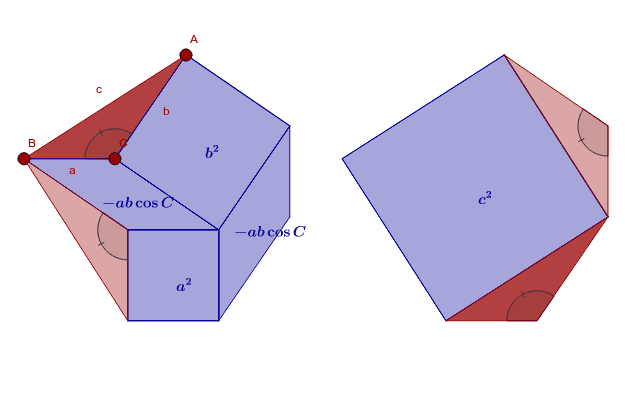
This example demonstrates the law of cosines in an obtuse triangle by dragging the red points. Core math concepts include the cosine theorem in trigonometry. The GeoGebra commands used include Line, OrthogonalLine, Point, Polygon, PointIn, Angle, Midpoint, Intersect, Vector, Translate, etc. Suitable for students in middle school and above to learn trigonometry and geometric construction.
GeoGebra Commands & Parameters
Line(B, C) → sOrthogonalLine(C, s) → tPoint(t) → SPolygon(S, C, 4) → poly12, s_1, c_5, f_1, k_1, T, UPolygon(B, C, 4) → poly1, b_2, c_3, a_3, d, G_1, D_1PointIn(poly12) → APolygon(A, B, C) → poly3, c, a, bAngle(A, C, B) → αPolygon(A, C, 4) → poly4, a_2, c_2, g, h, D, EMidpoint(A, D) → FLine(B, c_2) → iLine(D, a) → jIntersect(i, j) → GOrthogonalLine(B, c) → kPolygon(D, G, 4) → poly5, d_1, g_1, l, m, H, ILine(I, g) → nLine(E, m) → pIntersect(n, p) → JPolygon(I, J, E, D) → poly6, i_1, j_1, e_1, d_2Polygon(G, D, C, B) → poly7, g_2, d_3, c_4, b_1Polygon(H, G, B) → poly8, b_3, h_1, g_3Midpoint(G, I) → KAngle(B, G, H) → βMidpoint(B, D) → LMidpoint(D, J) → MVector(N, O) → uTranslate(B, u) → B'Translate(H, u) → H'Translate(I, u) → I'Translate(J, u) → J'Translate(E, u) → E'Translate(A, u) → A'Polygon(A', B', 4) → poly9, a', b', q, r, P, QPolygon(H', I', J') → poly10, j', h', i'Polygon(J', E', A') → poly11, a'_1, j'_1, e'Midpoint(B', J') → RAngle(J', I', H') → γAngle(A', E', J') → δ
AI Drawing Prompt Reference
Draw an obtuse triangle ABC and adjust its shape by dragging points A, B, and C. Construct a parallelogram using triangle ABC and add auxiliary lines and points to demonstrate the Law of Cosines. Finally, use translation to create a similar triangle A'B'C' that is positioned differently from the original triangle and show its relationship to the original triangle.
The prompt above was compiled from the original drawing commands and is for reference only.