
Demonstrate Scaling Effects on Volume
Loading the math board and drawing, please wait…
In collections
Geo&Alg:Area Volume Pythagorean Th.
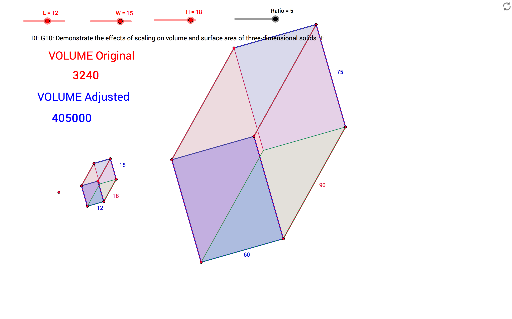
This example illustrates how scaling affects the volume of geometric shapes. It covers core concepts like ratios, volume calculation, and geometric transformations. Constructed using commands such as Point, Segment, OrthogonalLine, Circle, Intersect, Polygon, Rotate, Angle, Ray, Text, Dilate, Distance. Suitable for high school students and teachers studying solid geometry and ratio relationships.
GeoGebra Commands & Parameters
Point(Circle[A, L]) → BSegment(A, B) → aOrthogonalLine(A, a) → bOrthogonalLine(B, a) → cCircle(A, W) → dCircle(B, W) → eIntersect(d, b) → C, DIntersect(e, c) → E, FPolygon(D, A, B, F) → poly1, d_1, a_1, b_1, fRotate(B, 135°, F) → B'Angle(B, F, B') → αRotate(A, 135°, D) → A'Angle(A, D, A') → βRotate(F, 315°, B) → F'Angle(F', B, F) → γRotate(D, 315°, A) → D'Angle(D', A, D) → δRay(D, A') → gRay(A, D') → hRay(F, B') → iRay(B, F') → jCircle(D, H) → kIntersect(k, g) → G,Circle(A, H) → pIntersect(p, h) → I,Circle(F, H) → qIntersect(q, i) → J,Circle(B, H) → rIntersect(r, j) → K,Polygon(G, I, K, J) → poly2, g_1, i_1, k_1, j_1Polygon(D, G, I, A) → poly3, d_2, g_2, i_2, a_2Polygon(J, K, B, F) → poly4, j_2, k_2, b_2, f_1Polygon(G, D, F, J) → poly5, g_3, d_3, f_2, j_3Polygon(A, I, K, B) → poly6, a_3, i_3, k_3, b_3Text(VOLUME) → text1Dilate(D, Ratio, M) → D'_1Dilate(A, Ratio, M) → A'_1Dilate(B, Ratio, M) → B'_1Dilate(F, Ratio, M) → F'_1Polygon(D'_1, A'_1, B'_1, F'_1) → poly1', d'_1, a'_1, b'_1, f'_1Dilate(G, Ratio, M) → G'Dilate(I, Ratio, M) → I'Dilate(K, Ratio, M) → K'Dilate(J, Ratio, M) → J'Polygon(G', I', K', J') → poly2', g', i', k', j'Dilate(D, Ratio, M) → D'_2Dilate(G, Ratio, M) → G'_1Dilate(I, Ratio, M) → I'_1Dilate(A, Ratio, M) → A'_2Polygon(D'_2, G'_1, I'_1, A'_2) → poly3', d'_2, g'_1, i'_1, a'_2Dilate(J, Ratio, M) → J'_1Dilate(K, Ratio, M) → K'_1Dilate(B, Ratio, M) → B'_2Dilate(F, Ratio, M) → F'_2Polygon(J'_1, K'_1, B'_2, F'_2) → poly4', j'_1, k'_1, b'_2, f'_2Dilate(G, Ratio, M) → G'_2Dilate(D, Ratio, M) → D'_3Dilate(F, Ratio, M) → F'_3Dilate(J, Ratio, M) → J'_2Polygon(G'_2, D'_3, F'_3, J'_2) → poly5', g'_2, d'_3, f'_3, j'_2Dilate(A, Ratio, M) → A'_3Dilate(I, Ratio, M) → I'_2Dilate(K, Ratio, M) → K'_2Dilate(B, Ratio, M) → B'_3Polygon(A'_3, I'_2, K'_2, B'_3) → poly6', a'_3, i'_2, k'_2, b'_3Distance(a_1, k_2) → lDistance(k_1, a'_1) → mDistance(k'_1, k') → nText(ADJ) → text4
AI Drawing Prompt Reference
Draw a geometric illustration showing how scaling affects volume. Start by constructing a circle and two perpendicular lines, forming a quadrilateral. Rotate the quadrilateral around the circle's center to create two new shapes. Label the rotation angles and side lengths, using different colors for original and scaled figures. Finally, calculate and display the volumes of both shapes to demonstrate the relationship between scaling ratio and volume change.
The prompt above was compiled from the original drawing commands and is for reference only.