
Definite Integral Calculator with Geometric Illustration
Loading the math board and drawing, please wait…
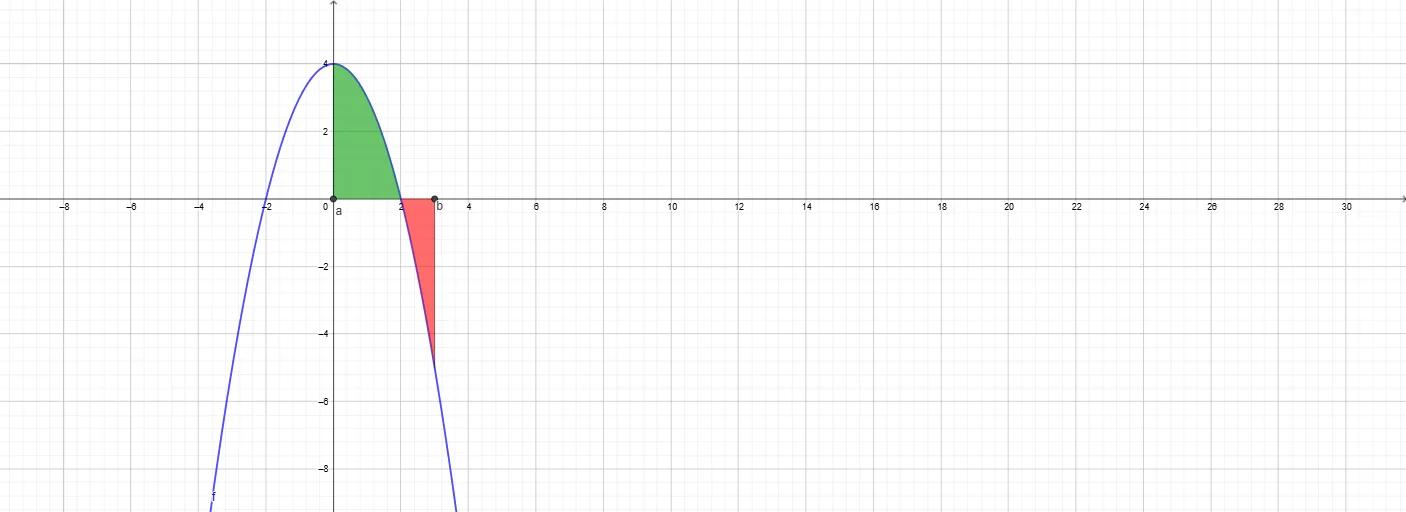
This example demonstrates how to enter parameters with interactive controls and then compute a definite integral over an interval [a,b], while simultaneously visualizing the associated area/accumulated quantity and relating it to constructed geometric figures. Key mathematical ideas include definite integrals, selecting the integration bounds, using a function f(x) and its graph to form the region under/over which the integral is taken, and parameter-driven construction that can be compared with shapes such as ellipses and parallelograms. How it is built: Textfield and multiple InputBox objects collect the function and the values of the endpoints/parameters; the Integral command computes the definite integral of f between the specified endpoints a and b; Segment is used to construct the interval-related segments that anchor the integration region. Additional labeled and derived objects (A/B, auxiliary variables like i, g/h, and text elements such as text3–text7) are used to render the geometry and display results clearly. Suitable for high school advanced students through early college calculus, especially for interactive classroom demos and self-study focused on connecting integral computation with geometric intuition.
GeoGebra Commands & Parameters
Textfield(a) → InputBox1Textfield(b) → InputBox2Textfield(f) → InputBox3Integral(f(x), a, b) → iSegment((a, 0), (a, f(a))) → gSegment((b, 0), (b, f(b))) → hIntegral(abs(f(x)), a, b) → oIntegral(f) → pTextfield(C) → InputBox4
AI Drawing Prompt Reference
Draw the definite integral graph of function f(x) over the interval [a, b], including the function graph, interval endpoints, integral region boundary lines, and integral value. First, input the function f(x), interval endpoints a and b, then compute the integral i, next draw the vertical lines g and h at interval endpoints a and b, and finally display the integral values o and p.
The prompt above was compiled from the original drawing commands and is for reference only.